

Infographics are going mega-viral and they’re building authority fast
Infographics are quietly outperforming almost every other content format right now.
They get saved more than videos.
They get shared more than carousels.
They position the creator as an authority instead of an entertainer.
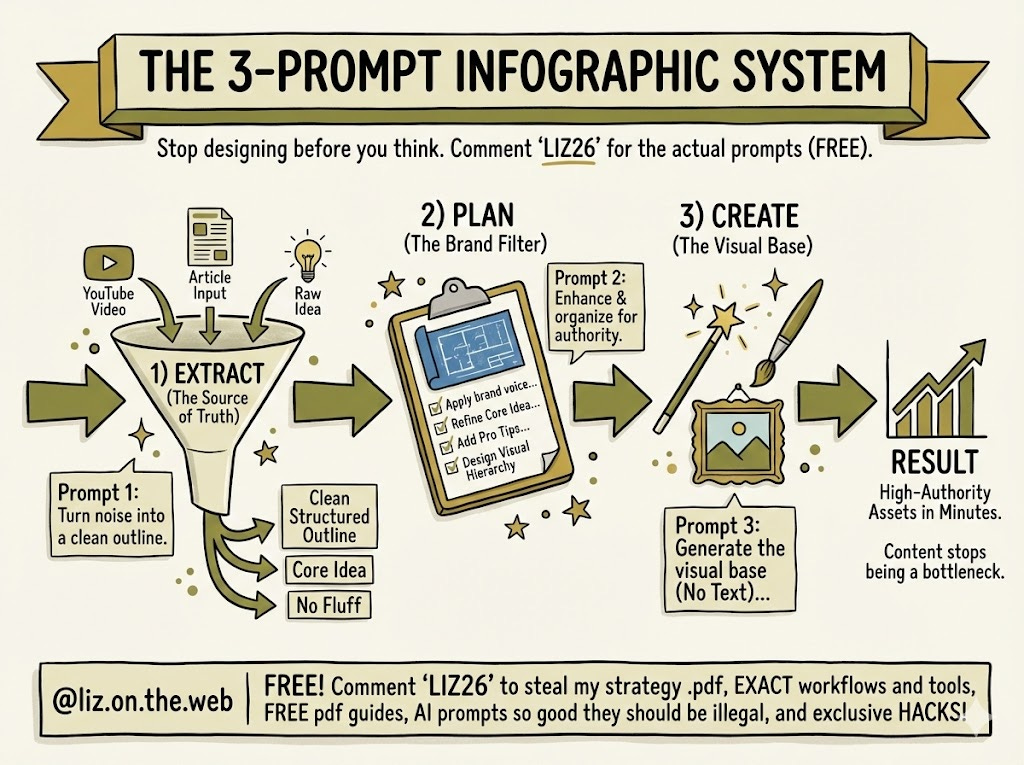
This is happening for a simple reason: people want clarity. Visual frameworks cut through noise, teach fast, and feel trustworthy. When someone saves your infographic, they are signaling value to both themselves and the algorithm.
The problem is not demand.
The problem is execution.
Most people either spend hours designing or post shallow graphics that look nice but say nothing. The fix is not better design skills. It’s a better system.
Below is a 3-prompt system that turns any input into a high-authority infographic in minutes.
The 3-prompt infographic system
This system separates thinking, planning, and creation. Each step has one job. That’s why it works.
PROMPT 1: SOURCE EXTRACTION
Choose ONE of the below based on your input type
The goal of Prompt 1 is to create a clean “source of truth.”
No design. No branding. No visuals.
PROMPT 1A: IMAGE INPUT
Act as an expert information extractor and visual analyst.

I will upload an image intended for social media or educational content.

Your task is to prepare this image to be turned into a high-performing infographic.

DO NOT design anything yet.

STEP 1: EXTRACT
- Extract ALL readable text verbatim.
- Identify the main idea and supporting ideas.
- Note emphasis, hierarchy, and sequencing.

STEP 2: ANALYZE VISUAL STRUCTURE
- Describe the layout (top-to-bottom flow, sections, columns, icons, arrows).
- Identify what draws attention first and why.
- Identify what makes this image save-worthy or shareable.

STEP 3: SUMMARIZE & STRUCTURE
- Rewrite the content as a clean outline suitable for ONE 4:5 infographic.
- Group ideas into logical sections (max 5–7).
- Remove fluff, repetition, or weak points.

OUTPUT FORMAT:
1. Core idea (1 sentence)
2. Clean structured outline
3. Key bullets per section
4. What works well
5. What could be improved for clarity or authority
PROMPT 1B: YOUTUBE VIDEO INPUT
Act as an expert content distiller.

I will provide a YouTube transcript (or paste it after this message).

Your task is to prepare this content for infographic creation.

DO NOT design anything yet.

STEP 1: EXTRACT
- Identify the main thesis of the video.
- Pull out steps, frameworks, examples, and warnings.
- Ignore filler, tangents, and anecdotes.

STEP 2: STRUCTURE
- Convert the content into a teachable framework.
- Limit to what fits on a single 4:5 infographic.
- Prioritize clarity over completeness.

STEP 3: ENHANCE
- Add missing context if something is implied but not stated.
- Note where a simple diagram or icon would help understanding.

OUTPUT FORMAT:
1. Core idea (1 sentence)
2. Infographic-ready outline
3. Bullet points per section
4. 1–2 practical examples
5. 1 common mistake or misconception
PROMPT 1C: ARTICLE INPUT
Act as an expert research summarizer.

I will provide an article link or paste the article text.

Your task is to prepare this content for infographic creation.

DO NOT design anything yet.

STEP 1: EXTRACT
- Identify the main argument or lesson.
- Pull out data, steps, frameworks, and quotable insights.

STEP 2: CONDENSE
- Reduce the article to what fits on ONE infographic.
- Remove narrative, storytelling, and repetition.

STEP 3: ORGANIZE
- Group ideas into logical, visual sections.
- Make it skimmable and instructional.

OUTPUT FORMAT:
1. Core idea (1 sentence)
2. Sectioned outline
3. Bullet points per section
4. Key data or examples
5. Suggested infographic angle
PROMPT 1D: RAW IDEA INPUT
Act as an expert researcher and educator.

I will provide a raw idea for an infographic.

Your task is to turn this idea into a solid, infographic-ready knowledge base.

STEP 1: RESEARCH
- Identify the core concept.
- Pull practical, real-world insights.
- Avoid vague or motivational content.

STEP 2: STRUCTURE
- Turn the idea into a clear framework.
- Limit scope to a single 4:5 infographic.

STEP 3: VALIDATE
- Add 1–2 specific examples.
- Add 1 mistake people commonly make.

OUTPUT FORMAT:
1. Core idea (1 sentence)
2. Structured outline
3. Bullet points per section
4. Examples
5. Mistake to avoid
PROMPT 2: INFOGRAPHIC PLANNING + BRAND APPLICATION
This prompt is sent after Prompt 1’s output.
Use the SOURCE OF TRUTH from the previous response.

Your task is to turn it into a comprehensive infographic PLAN for my brand.

BRAND INFO:
- Brand name:
- Handle:
- Audience:
- Voice:
- Platform:
- CTA goal:

DESIGN SYSTEM:
- Canvas size (4:5):
- Background color:
- Primary text color:
- Accent colors:
- Fonts (headline / body):
- Icon style:
- Density (airy / balanced / dense):

PROCESS:
1. Refine the core idea so it is instantly clear.
2. Enhance the content:
   - Add 1–2 pro tips
   - Add 1 concrete example
   - Add 1 mistake callout
3. Design the infographic STRUCTURE:
   - Section order
   - Visual hierarchy
   - Icon and layout guidance
4. Write the FINAL on-canvas text.
5. Ensure it is save-worthy and authority-building.

OUTPUT FORMAT:
1. Final infographic outline
2. Exact on-canvas text
3. Layout map
4. CTA copy
PROMPT 3: CREATE THE INFOGRAPHIC
This is the execution step.
Create a vertical 4:5 infographic visual base.

STYLE:
- Hand-drawn sketchnote / graphic recording
- Clean, high-contrast, professional

REQUIREMENTS:
- Canvas size: 1080x1350 or 1080x1440
- Use brand colors [INSERT YOUR BRAND COLORS HERE]
- Include arrows, containers, and icons
- Clear blank areas for text
- NO readable text or letters

OUTPUT:
One infographic visual base, ready for text overlay.
📌 FREE Resources to Help You Grow
Free Instagram Growth Guide - Fix your profile, content strategy, and conversions in under an hour.
FREE How to Make Money Online - Want to make money online but don’t know where to start or what business models make sense for you and are actually profitable? Grab this FREE starter kit!
Viral Carousel Creator - Create custom, viral Instagram carousels in SECONDS.
Autoviral - Daily, custom Instagram reels done-for-you
Instagram EDGE - My viral Instagram growth & sales course
Monetize U (Signature Program)
Master the Web of Monetization system and build real online income.
👉 Join here: https://stan.store/dreammoneymama/p/monetizeu-prelaunchWant More? Explore My Free Articles HERE
Deep dives, strategies, tutorials, and behind-the-scenes breakdowns.
Great ideas, thanks LIZ26
Is there a way to copy and paste the prompts (new to substack)