
Which one is better. You have asked it, someone answered with total confidence, and the answer changed three months later.
While that argument runs, the real choice sits untouched. Both companies build the same three shapes. Picking by logo means you use the wrong shape for the job, then blame the brand for the result.
What you will be able to do
Name the three shapes both companies build, and match them across brands.
Read any model name and tell the generation apart from the size tier.
Pick between the two tools using two questions, in about ten seconds.
Hand over a whole job instead of asking a question, and get a finished file back.
Spot the five quiet gates that make a request fail without an error message.
This is for anyone paying for one and wondering about the other, or paying for both and not sure why.
The proof behind this
Liz Elliott teaches beginners and non-technical people, and she runs 33 active social brands. She has no loyalty to a logo, and neither does this lesson.
What this lesson is
Lesson 2.4 of the free AI for Entrepreneurs course, in Module 2: Choosing Your AI.
The question people ask is "which one is better." That question has no answer, and asking it keeps you stuck.
Here is what is actually true. Both companies build the same three shapes, and they always have. A chat surface for thinking. A work surface that hands you a finished file or takes a real action in an app you connected. A build surface that makes something that runs.
Anthropic calls those Claude, Cowork, and Claude Code. OpenAI calls them Chat, Work, and Codex. Different names, same three shapes. When one company ships something new, the other usually ships its version within a few months. So whoever is ahead today is a snapshot, not a fact about the world.
Think of it like two supermarkets on the same street. Both sell bread, milk, and eggs. One has better bread this month. Next month the other one hires a new baker. If you have a loyalty card for one and refuse to walk into the other, you eat worse bread for no reason.
What does not flip every few months is the shape of your own work. Some of your work lives in cloud apps: research, docs, decks, reports. Some of it lives on your actual computer: downloads, spreadsheets, PDFs, the mess on your desktop. That difference is stable, and it is the best thing to choose on.
The second stable thing is how clear you are. When you already know exactly what you want, you want a tool that starts moving. When the job is fuzzy or the stakes are high, you want one that asks questions and pauses before it commits.
Those two questions pick your tool. Not the logo.
New here? Use the free AI for Entrepreneurs course outline to read this series in the best order.
Do it
Part 1: Learn the three shapes
Memorize this table and you can drop any new product into it.
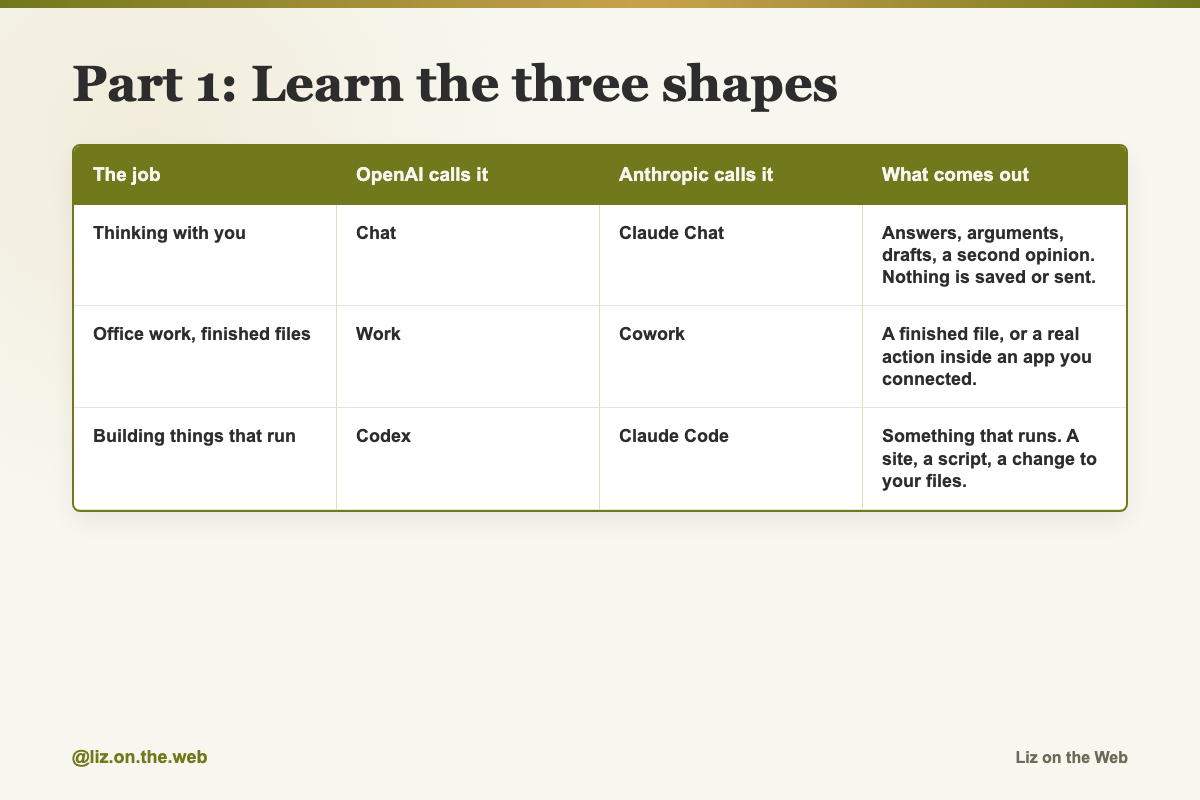
The job / OpenAI calls it / Anthropic calls it / What comes out
Thinking with you
OpenAI calls it: Chat
Anthropic calls it: Claude Chat
What comes out: Answers, arguments, drafts, a second opinion. Nothing is saved or sent.
Office work, finished files
OpenAI calls it: Work
Anthropic calls it: Cowork
What comes out: A finished file, or a real action inside an app you connected.
Building things that run
OpenAI calls it: Codex
Anthropic calls it: Claude Code
What comes out: Something that runs. A site, a script, a change to your files.
One line sorts all of it: Chat gives you thinking. Work gives you a finished thing. The build surface gives you something that runs. Name which one you want before you type, and you are ahead of most people.
Inside ChatGPT the first two sit on a toggle right above the box you type in. The build surface sits one level up, in a product selector, not on that toggle. So switching to it means leaving the chat product, not flipping the switch. In Claude, Chat and Cowork are separate places in the desktop app sidebar, and Claude Code is its own thing.
Part 2: Read a model name
Model names carry two pieces of information and beginners mix them up.
The number is the generation. It tells you how new the underlying tech is.
The word is the tier. It tells you how much power you are using and paying for.
So a lineup might ship as one generation with three tier names on it. One example lineup used Sol for the strongest, Terra for the everyday one, and Luna for the fast cheap one. When the next generation shipped, the same three tier names came with it. Same three jobs, newer brains.
That is the whole trick. When you see a new name, ask which of the three sizes from lesson 2.1 it is. The tier names will keep coming back. The numbers will keep going up.
On prices. Guides love to quote model prices as two numbers, like "$5 in and $30 out per million tokens." Those are pay-as-you-go prices for people building software on the API. If you pay a monthly subscription and use the app, those numbers are not your bill. They are still useful for one thing: they tell you the ranking. The tier that costs five times more per token is the tier that costs you more of your monthly limit per message.
On what the tiers share. In a good lineup, all the tiers share the same limits: how much they can read at once, how much they can write at once, and how recent their training goes. The only things that change between tiers are speed, smarts, and price. Check that before you assume the cheap one is crippled.
On the knowledge cutoff. Every model was trained up to a date and knows nothing after it. Ask any of them about something recent and you get a guess, unless you paste in the source or turn search on. That is not a bug in one brand. It is how all of them work.
Part 3: Pick by where the work lives
This is the one that decides most jobs.
Cloud tools are happiest with cloud work. Research, analysis, documents, decks, charts, reports. Anything where the inputs are already online and the output is a polished file.
The Claude side sits closer to your actual machine. Cowork reads and writes the real files and folders on your computer, and it can drive your browser. That makes it strong on the messy stuff: downloads, spreadsheets, PDFs, dashboards, and cleaning up what is already sitting on your desktop.
So ask one question: is this work mostly in the cloud, or mostly on my machine? Cloud work goes to the cloud tool. Local files go to the local one.
If you run a team, there is a second factor. Cowork has had the stronger team controls: folder-level access so it only touches what you allow, approval steps before big actions, team permissions, and spend limits. That is what lets you hand a team an agent without losing oversight. The cloud side leans on its broader ecosystem instead, which is lighter to start and gives you less fine control. Check both before you commit a team, because this is exactly the kind of thing that changes.
Part 4: Pick by how sure you are
Second question: do I already know exactly what I want?
If yes, use the one that just goes. ChatGPT Work tends to start moving with less back and forth. That shows up most when building. Describe a tool or an automation and it makes a first version fast instead of asking ten questions.
If it is fuzzy or high stakes, use the one that checks in. Cowork tends to ask clarifying questions before it starts, explain what it is doing along the way, and pause before a bigger decision. When you want a second brain in the room, that is worth the extra minutes.
These are tendencies, not laws, and they shift with every release. Run one real job through each and trust what you see over what you read.
Part 5: Hand over a job, not a question
Both work surfaces are built to take a whole outcome. Most people still prompt them one question at a time and then wonder what the fuss is about.
The old way is ten prompts and you assemble the result. The new way is one brief and you get the result.
The test for whether a task belongs in a work surface: would you have opened another app to finish it? If yes, it belongs there.
Use the outcome handoff prompt below. It gives the tool the outcome, the context, the rules it cannot break, the deliverable, and what done looks like. Then let it run across as many steps as it takes.
Part 6: Know the five quiet gates
These are the reasons a request fails with no error message. Each one has burned a lot of people.
Connections do not work in plain Chat. The pieces that let an AI reach into your email, drive, chat app, or code live in the Work and build surfaces. Ask plain Chat to read your inbox and it cannot, and it will not always tell you why.
Writing to your apps is off by default. Even after you connect an app, sending and drafting usually starts switched off, and once on it still asks you every time. On business and enterprise accounts an admin turns it on per app in workspace settings. If your drafts never appear, that is why.
Normal folders default to read-only. A build surface can read your files and then quietly fail to change a single one. You have to grant write access when it asks. If it says it did the work and nothing changed on disk, this is it.
The work and build surfaces share one usage pool. They are the same engine underneath. A long building session on Tuesday can eat the budget you were saving for Friday's report, and nothing warns you at the time.
Features are gated by plan and by country. Some flagship features need a mid or top paid tier, and some are not available in every region. Check before you build a plan around one.
Two extras worth knowing. On Windows, the feature that lets an AI control your screen runs on your actual desktop, so you watch the cursor move and you cannot use the machine for something else. On a Mac you grant Screen Recording and Accessibility permissions first. And if you cannot find the Work toggle on the web, check the desktop app, which has been the more reliable place to find it.
Part 7: Run the comparison yourself
Reading comparisons is not the same as knowing. Do this once and you will stop asking which one is better.
Pick one real job you would normally break into ten prompts.
Decide where the work lives: cloud apps, or files on your machine.
Write one outcome brief using the handoff prompt below.
Run it in the matching tool. If it is fuzzy or high stakes, run it in the one that asks questions and answer them honestly.
Run the same brief in the other tool.
Compare the two finished deliverables. Set your default for that type of job. Not for everything, just that type.
Then keep both accounts. One paid plan and one free account still gets you a second opinion for nothing, which is the whole point of lesson 2.1's review step.
Copy and paste
The which-tool question
Run this in your head, or paste it somewhere you will see it, before any job.
Before starting any job, answer these three:

1. Does this work live in cloud apps, or in files on my machine?
   Cloud -> the cloud work surface.   Local files -> the local one.

2. Do I already know exactly what I want?
   Yes -> the tool that just executes.   Fuzzy or high stakes -> the one that checks in.

3. Does anyone besides me need approval steps or spend limits?
   Yes -> the one with folder access, approvals, permissions, and spend limits.
The model picker rule
Fill in your own current tier names and prices. Use it before you pick a model inside either brand.
Use this rule to pick a model before every task.

Ask: would a wrong answer here cost me real time or real money?
  YES -> the top tier [name: ____]

Ask: is this everyday business work I need a lot of, where speed
and smarts both matter?
  YES -> the middle tier [name: ____]

Ask: is this small, repetitive, and needed right now?
  YES -> the cheap fast tier [name: ____]

All tiers in one generation usually share the same reading limit,
writing limit, and knowledge cutoff. Only speed, smarts, and price change.
The outcome handoff
The main prompt for either work surface. Use it instead of asking a question.
Here is the outcome I want: [the finished thing, named exactly].

Context you need:
- Who this is for: [audience]
- What I already have: [files, apps, data, and where they live]
- Hard rules you cannot break: [budget, tone, format, deadline]
- What good looks like: [an example or a description]

Deliverable: [a spreadsheet / a slide deck / a doc / a small web app].
Done looks like: [what has to be true before you hand it back].

Work across as many steps as it takes. Do not hand me a list of
things for me to go do.
A one-line example of an outcome request
The shortest version of the same idea, for when the job is simple.
Analyze last quarter's sales and give me the three biggest opportunities.Chat 1: pressure-test a decision
For the decision you keep flip-flopping on.
I keep going back and forth on a decision, and I want you to think it through with me, not just agree with me.

The decision:
[WHAT YOU'RE DECIDING]

What matters most to me here:
[YOUR PRIORITIES / CONSTRAINTS]

What I'm leaning toward, and why:
[YOUR CURRENT LEAN]

Do this:
1. Lay out the real options, including any I haven't named.
2. Give the strongest honest case FOR each one.
3. Tell me the biggest risk I'm underweighting.
4. Ask me up to 3 questions if something important is missing.
5. Then give me your recommendation, how confident you are, and what would change your mind.

Push back if my reasoning is weak. I would rather be challenged now than wrong later.
Chat 2: the message you are nervous to send
For the hard email you have rewritten five times.
Help me write something I'm nervous to send.

The situation:
[WHO IT'S TO AND WHAT'S GOING ON]

My rough draft or bullet points:
[PASTE / NOTES]

The tone I want:
[e.g. warm but firm, kind but honest, short and professional]

Give me:
1. A clean version that says the hard part clearly, with no passive-aggression and no over-apologizing.
2. A softer version and a more direct version, so I can choose.
3. One line I could add if they push back.

Keep it in my voice. Do not make it sound like a corporate template.
Chat 3: rehearse the conversation
For a raise, a negotiation, or a hard personal talk. Practice with nobody watching.
Role-play a conversation with me so I can practice before the real thing.

The conversation:
[WHAT IT IS, e.g. asking for a raise, renegotiating a contract, a hard personal talk]

Who you're playing:
[THE OTHER PERSON AND THEIR LIKELY MINDSET]

What I want to walk away with:
[YOUR GOAL]

Play them realistically and a little resistant. Raise one objection at a time and wait for my answer. Do not go easy on me.

After about 6 exchanges, stop and tell me: where I was convincing, where I got weak, and the two lines I should actually use on the day.
Chat 4: brain dump to plan
For the week where everything is in your head at once.
I'm overwhelmed and it's all in my head. I'm going to dump it, and I want you to turn it into a plan.

Everything on my plate right now:
[BRAIN DUMP, MESSY IS FINE]

Do this:
1. Sort it into: do this week, can wait, and should probably drop.
2. Flag anything that's actually urgent or has a real deadline.
3. Tell me the 3 things to do first, and why those three.
4. Point out anything I'm treating as one task that's really several.

Be honest about what I'm overcommitting to.
Chat 5: teach me this fast
For a contract clause, a health term, or a tool you do not understand yet.
Teach me [TOPIC / THE THING I'M TRYING TO UNDERSTAND] like I'm smart but completely new to it.

Do it in this order:
1. The single most important idea, the one everything else hangs on.
2. A plain, real-world analogy.
3. How it actually works, step by step, no jargon (or define any term you have to use).
4. The most common mistake beginners make.
5. One thing I could do or try today to make it click.

If I've given you something specific to react to, use my real example: [PASTE ANYTHING RELEVANT]
Work 1: research to a finished document
When you want the brief, not the notes you would turn into a brief at 11pm.
Research this and give me back a finished document I could actually use or send, not just notes.

What I need researched:
[TOPIC / QUESTION / LIST]

Who it's for and what they care about:
[AUDIENCE]

What I want at the end:
[e.g. a one-page brief, an 8-slide deck, a comparison table]

Rules:
- Put a short summary and your recommendation at the very top.
- Cite your sources so I can check them.
- Flag anything you're unsure about instead of guessing.
- Export it as [.docx / .pdf / slides] so it's ready to use.
Work 2: clean up a messy file
For the export nobody wants to touch.
Here's a messy [spreadsheet / export / list]: [ATTACH OR PASTE]

Clean it up and give it back to me usable:
1. Remove duplicates and fix the obvious formatting problems (dates, capitalization, blank rows).
2. Tell me exactly what you changed, so I can trust it.
3. Add [a summary at the top / totals / a simple breakdown by [CATEGORY]].
4. Give it back as an editable spreadsheet with real formulas, not a picture of a table.

If something looks wrong or inconsistent, point it out instead of silently fixing it.
Work 3: a recurring update that runs without you
Set once, arrives every week. Needs at least one app connected.
Set this up to run on a schedule so I don't have to remember it.

Every [DAY AND TIME], I want you to:
1. Pull [SOURCE, e.g. a channel, folder, or sheet you've connected].
2. Summarize [what changed / what needs my attention / the numbers that matter].
3. [Email it to me / drop it in a doc] as a short one-page update.

Keep it skimmable: the 3 things I actually need to know at the top, details below. Tell me now if you need me to connect an app first.
Work 4: combine scattered pieces
Six files and a notes doc into one thing you can send.
I have a bunch of scattered pieces and I need one clean [proposal / report / summary / plan] out of them.

Everything I have:
[ATTACH FILES / PASTE NOTES]

The format and tone I want:
[e.g. our house style, formal, friendly]

Who's going to read it:
[AUDIENCE]

Do this:
1. Pull it into one coherent document.
2. Where there are gaps, fill them with clearly-labeled assumptions I can check.
3. Flag anything that contradicts itself across the pieces.
4. Export as [.docx / .pdf] so it's ready to send.
Work 5: inbox triage with drafts written
Sorting is the easy half. The value is the drafted replies.
Go through [my inbox / messages] from [this week] that I haven't dealt with.

1. Sort them into: needs a real reply, can wait, and ignore.
2. For the ones that need a reply, draft a response in my voice, short and human.
3. Flag anything time-sensitive, or anything that could quietly become a problem.

Do not send anything. Just leave the drafts ready for me to review and send.
Build 1: clean up a folder of files
The lowest-risk way into the build surface. Copy the folder first.
Open this folder: [FOLDER]. I have a mess of files I was never going to fix by hand.

What I want:
1. [Rename / reorganize / convert] everything by this rule: [YOUR RULE, e.g. rename to YYYY-MM-Description, sort into subfolders by year].
2. Show me your plan first and let me approve it before you touch anything.
3. Then do it, and tell me exactly what changed.

Grant write access when it asks, or nothing will actually change on my computer.
Build 2: turn a monthly task into a button
For the same tedious hour you spend every month.
Every [WEEK / MONTH] I do this by hand and I'm tired of it: [DESCRIBE THE TASK, STEP BY STEP].

Build me something I can re-run that does it for me:
1. It takes [INPUT, e.g. this kind of file or export] and produces [OUTPUT, e.g. this formatted summary] the same way every time.
2. Explain in plain English how to run it, like I've never done this before.
3. Make it easy to tweak later when the inputs change.

Start by telling me what you'll build and what you need from me.
Build 3: a simple tool people can use
A tracker, checklist, or calculator, published to a link. Publishing may need a paid tier.
Build me a simple [tracker / checklist / calculator / dashboard] for [PURPOSE, e.g. tracking projects, chores, orders, a budget].

1. Let me [add / update / check off] things easily, no spreadsheet skills needed.
2. Keep it clean and obvious to use.
3. Publish it so [only me / my team / my family] can open it in a browser with a link.

Ask me what fields or columns it should have before you build, if that would help.
Build 4: a one-page site
A real page, live, with a form. Publishing may need a paid tier and may not be available in every country.
Build me a clean one-page [website / landing page / event page] for [PURPOSE, e.g. my new service, an event, a portfolio].

Include: [e.g. a headline and short description, an email sign-up form, a simple pricing section, an RSVP button].

Style: [e.g. minimal, warm, bold; match my colors: [COLORS]].

When it's ready, publish it to a link I can share, and walk me through anything I need to do on my end.
Build 5: explain what you own, then improve it
Use the build surface as a tutor on your own setup.
Open [this folder / these files]: [WHAT IT IS].

First, before changing anything: explain in plain English what each part does and how it fits together, like you're teaching me my own setup.

Then make this one improvement: [SPECIFIC CHANGE, e.g. make it work on phones, fix the thing that's broken, add this feature].

Go one step at a time and tell me what you're doing as you go, so I actually learn it instead of just getting a result.
Watch out
You ask which one is better
That question has no answer and it keeps you comparing instead of working. Ask where the work lives and how clear the outcome is.
You prompt a work surface one question at a time
These tools are built to take a whole job. A question gets you an answer and leaves the work with you. Name the finished deliverable instead.
You expect app connections to work in plain chat
They only run in the work and build surfaces. The request will fail quietly. If an AI cannot see your inbox, check which surface you are in before you blame the model.
You assume your files changed
Normal folders start read-only. Grant write access when it asks, then open the folder yourself and look.
You burn one budget on the other job
The work and build surfaces draw from the same pool. If Friday's report matters, do not spend Tuesday on a long building session.
You get loyal to a logo
Whoever is ahead this month may be behind next month. Keep one paid plan and one free account so you always have a second opinion available for nothing.
You read a tier name as a version number
The tier names carry forward into the next generation. The number is what tells you how new the tech is.
You point an agent at your whole computer
These tools can rename, move, and change real files. Grant access to one folder, not everything. Copy anything you care about before the first run. Show me your plan first is a line worth putting in every build prompt.
Check yourself
[ ] I can name the three shapes and match them across both brands.
[ ] I know which surface I am in when I type, and I choose it on purpose.
[ ] I can point at a model name and say which part is the generation and which is the tier.
[ ] I ran one real job as an outcome brief, not as ten questions.
[ ] I ran the same brief in both tools and compared the deliverables.
[ ] I checked whether write access was granted before assuming files changed.
[ ] I have one paid plan and one free account on the other side.
Do this now
Pick one job from this week that you would normally break into ten prompts. Write it once using the outcome handoff prompt, and run it in whichever tool matches where the files actually live.
Keep going
Next in AI for Entrepreneurs:
Part 10: Your starter stack, and what to ignore
Part 11: Day one: the five things to do first
Part 12: Day two and three: the next ten things
Every part of this course sits in reading order in the free AI for Entrepreneurs course outline.
This part is free, start to finish. Subscribing keeps the rest of the course coming and opens the paid parts.
Tell me in the comments which of the two you use, and for what, and I will point you at the right next part.
This maps well to how I help clients budget for AI. Many ask about AI costs; I tell them to treat it like any expense: use free tiers for chat/thinking, paid tiers only for work/build surfaces that produce deliverables. Set a monthly AI budget as part of overall tracking — it stops the "I'm paying for unused features" regret.