
There is a dropdown with three or four names in it, and a setting next to it about how hard to think. You picked one once. You have never changed it since.
One of those settings quietly spends your limit on work that never needed it. The other hands you a shallow answer on the decision that mattered most this month. Both feel exactly the same while they are happening.
What you will be able to do
Decide fast or deep on any task in about ten seconds, using three questions.
Escalate to a bigger model only when the work has earned it, and know when it has.
Set the effort level so simple work stays cheap and hard work gets real thought.
Use your most expensive model to build things a cheaper model can run for months.
Get an AI to flag what it is unsure about instead of guessing at you.
This is for anyone who wants a rule instead of a guess. Beginner friendly, and the model names are marked as examples, because names go stale in months.
The proof behind this
Liz Elliott runs 33 active social brands and runs her whole operation on AI automations across several computers. At that volume you cannot open the biggest model for everything, so the picking rule is not theory.
What this lesson is
Lesson 2.3 of the free AI for Entrepreneurs course, in Module 2: Choosing Your AI.
Lesson 2.1 gave you three sizes: fast, default, deep. This lesson is about picking one, on a real task, in a few seconds.
Here is the thing that makes it simple. Capability costs money. The deep model is not free. It costs more of your usage limit, it takes longer to answer, and on a small job it gives you nothing back for the extra spend. Using it for everything is like taking a taxi to the end of your own driveway.
Compare it to hiring help. For sorting a box of receipts you want somebody fast and cheap who will not stop to philosophize. For deciding whether to sign a five-year lease you want somebody careful, expensive, and slow, and you want them to think out loud so you can follow their reasoning. Same person for both jobs is the wrong answer twice.
So you match the model to the stakes, not to the mood. Most of your week is receipts. A small slice is the lease.
There is a second dial next to the size. Effort, or thinking, or reasoning depending on which app you are in. It tells the model how hard to work before it answers. Turn it up and the answer takes longer and comes back more careful. Turn it down and it comes back quick and cheap. This dial matters as much as which model you picked, and most people never touch it.
One more thing worth knowing before you start. The specific model names in every guide you read, including this one, go stale in months. Prices change. New models ship and old ones retire. The questions below do not change. Learn the questions. The names live in a reference table at the end, clearly marked as examples.
New here? Use the free AI for Entrepreneurs course outline to read this series in the best order.
Do it
Part 1: Ask three questions
Before you type, answer these. It takes about ten seconds.
Question 1: Does this need thinking, or just doing?
Thinking means weighing options, finding a root cause, planning an approach, making a judgment call. Doing means the decisions are already made and something needs writing, formatting, sorting, or summarizing.
Question 2: Is the job long, or short?
Long means a big document, a pile of files, many steps, or work that has to hold a lot in mind at once. Short means one thing, one answer.
Question 3: What happens if it is wrong?
If a wrong answer costs you nothing but thirty seconds, that is a low-stakes task. If it costs money, a client, a deadline, or a legal problem, it is not.
Now read the row that matches.
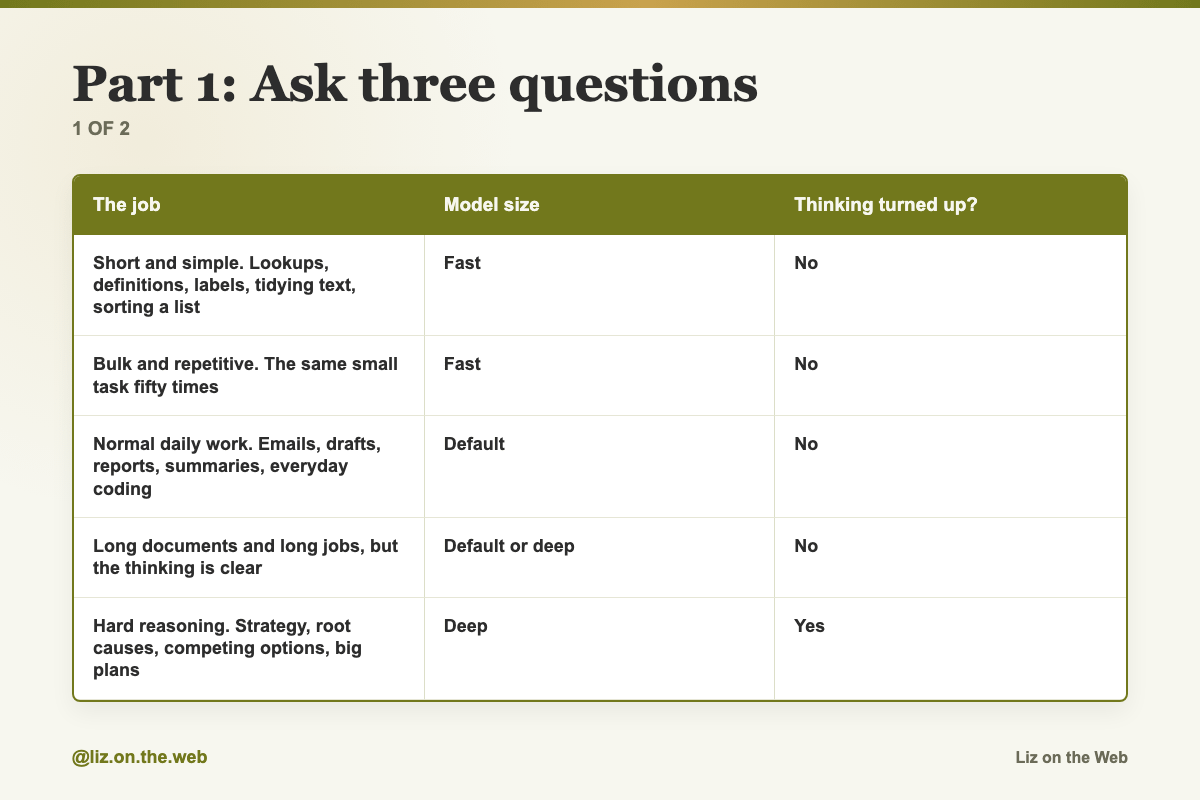
The job / Model size / Thinking turned up?
Short and simple. Lookups, definitions, labels, tidying text, sorting a list
Model size: Fast
Thinking turned up?: No
Bulk and repetitive. The same small task fifty times
Model size: Fast
Thinking turned up?: No
Normal daily work. Emails, drafts, reports, summaries, everyday coding
Model size: Default
Thinking turned up?: No
Long documents and long jobs, but the thinking is clear
Model size: Default or deep
Thinking turned up?: No
Hard reasoning. Strategy, root causes, competing options, big plans
Model size: Deep
Thinking turned up?: Yes
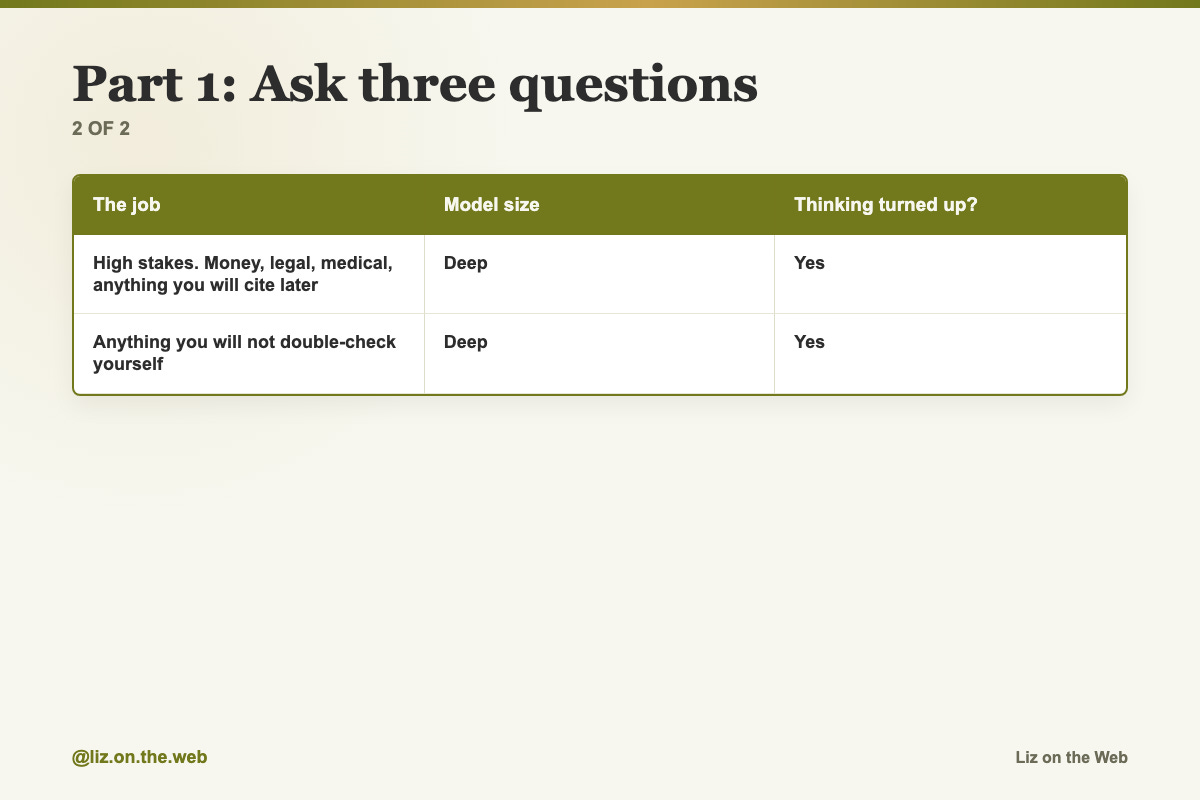
High stakes. Money, legal, medical, anything you will cite later
Model size: Deep
Thinking turned up?: Yes
Anything you will not double-check yourself
Model size: Deep
Thinking turned up?: Yes
If you do not know, use the default model. That is what it is for. Around eighty to ninety percent of most people's work runs fine there.
Part 2: Escalate on evidence, not on a hunch
Do not open the deep model because the task feels important. Open it when the work has proven it needs it. The ladder:
Start on your default model. Every time.
If the answer is thin, add context before you switch. Most weak output comes from a weak ask. Give it more detail, say who the output is for, and say what a good version looks like. Try again on the same model.
If it is still thin after two honest tries, escalate. Two disappointing answers is your signal, not one.
Do not drag the mess with you. If you are twelve messages deep in a tangled thread, do not just switch the model picker. Start a clean chat on the bigger model and paste in a proper brief. A big model gets far more out of a clean, well-structured brief than out of a long messy thread.
Drop back down when the hard part is over. Once the plan exists, the writing and building can go to a cheaper model.
Part 3: Move the effort dial
Effort tells the model how hard to think before it answers. Most apps offer something like four levels, and the wording varies.
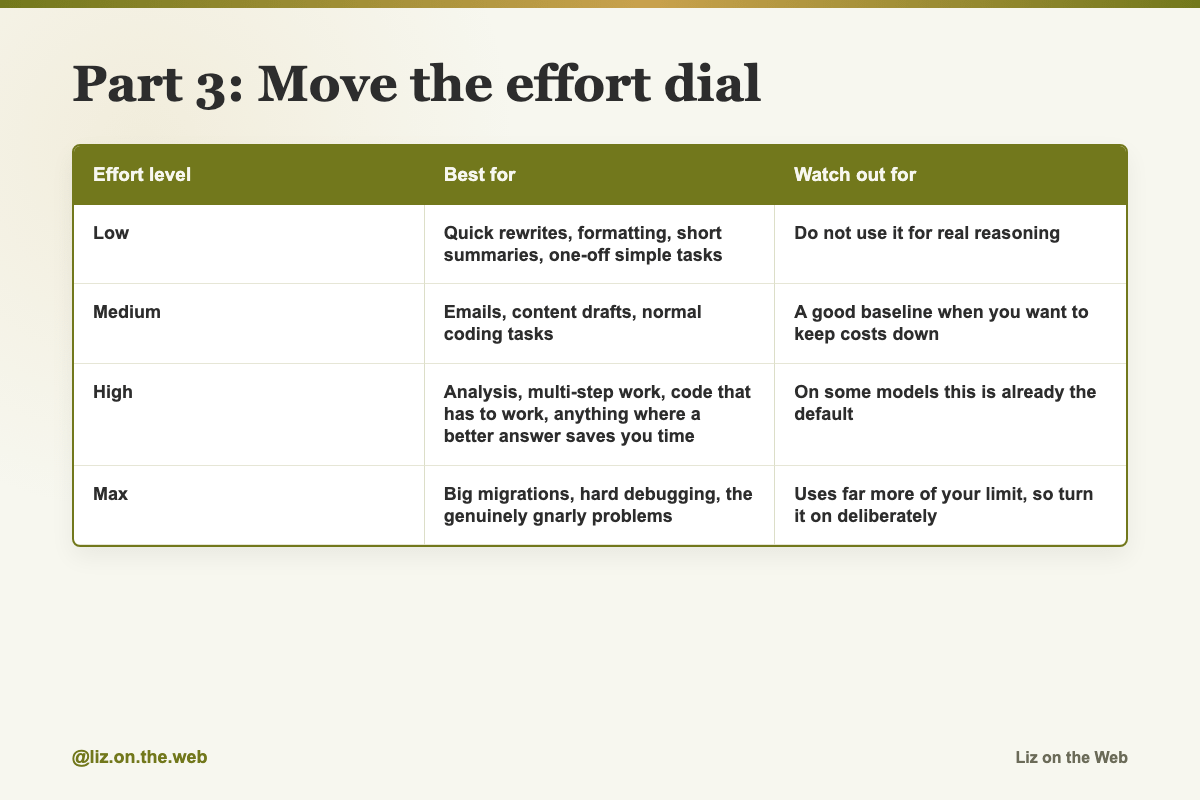
Effort level / Best for / Watch out for
Low
Best for: Quick rewrites, formatting, short summaries, one-off simple tasks
Watch out for: Do not use it for real reasoning
Medium
Best for: Emails, content drafts, normal coding tasks
Watch out for: A good baseline when you want to keep costs down
High
Best for: Analysis, multi-step work, code that has to work, anything where a better answer saves you time
Watch out for: On some models this is already the default
Max
Best for: Big migrations, hard debugging, the genuinely gnarly problems
Watch out for: Uses far more of your limit, so turn it on deliberately
The pattern to run: start at high, drop to medium when the task is routine, and save max for jobs that have already beaten you once. Do not leave it on max for chat-style work. It burns your limit fast for no gain.
Two notes. Some newer models handle this by themselves and adjust the effort to the question, so there is no dial to find. And in the terminal version of Claude, effort is a slash command: /effort high. In the app, look for a thinking or reasoning setting.
Part 4: Never hand a long document to the small fast model
This is the single most expensive mistake in this lesson, because it fails quietly.
Small fast models lose track of detail across a long file. They do not warn you. They give you a confident summary that is missing the thing in the middle you actually needed. Bulk jobs, yes. Long documents, no.
Long files go to the default or the deep model. If a model advertises a huge memory for one document, that is the one to use for the hundred-page contract.
Part 5: Spend the deep model on things you keep
The best use of an expensive model is not doing one task well. It is building something a cheaper model can run for months. Three moves, in this order.
Move 1: Upgrade the instructions you already use.
You probably have saved instructions somewhere. Project instructions in your AI app, saved Skills, or instruction files in a project folder. These are usually vague, because you wrote them in a hurry. A big model rewrites them into something specific, and the upgraded version keeps working after you drop back down to a cheaper model.
Do one at a time. Copy your instructions out, run the upgrade prompt below, and paste the improved version back in.
If your instructions live in files on your computer, there is a version of that prompt that edits them directly. Before you run it, copy the whole folder somewhere safe. That prompt rewrites every instruction file in one pass and does not stop to ask. Review each change afterward and keep the good ones.
Move 2: Unstick the problem you have been stuck on for weeks.
The trick is not a smarter question. It is packaging the whole mess and moving it somewhere clean.
In the chat where you hit the wall, run the capture prompt below. It turns the entire thread into one complete handoff: the goal, what exists now, every attempt, every error, every dead end, the rules you cannot break, and the exact place you are stuck.
Open a brand new chat. Pick your deep model. Set effort high.
Paste the handoff and run the solve prompt.
You get a root cause instead of another surface fix.
Move 3: Build a plan a cheaper model can run.
Have the deep model build the whole plan once. Phases, tasks broken small, and a clear description of what "done well" looks like for each task. Then hand one step at a time to a cheaper model. You keep the good thinking without paying for the thinker every day.
The part that makes this work is the acceptance criteria. If a task is vague, a cheap model will guess. If a task says exactly what finished looks like, it will not.
Part 6: Make it show doubt
Newer models are better at saying they are unsure instead of making something up, but you still have to ask. Add one of the uncertainty lines below to any answer you plan to rely on. Use them for research, legal questions, health questions, and anything with a number, date, quote, or name in it that you might repeat later.
If you get answers that open by agreeing with you before they have thought about it, add the pushback line too.
Part 7: When the answer feels thin, fix your words first
Newer models tend to read your prompt more literally and match the answer length to how big the ask sounds. That is usually why an answer comes back shorter and flatter than you expected. Five fixes:
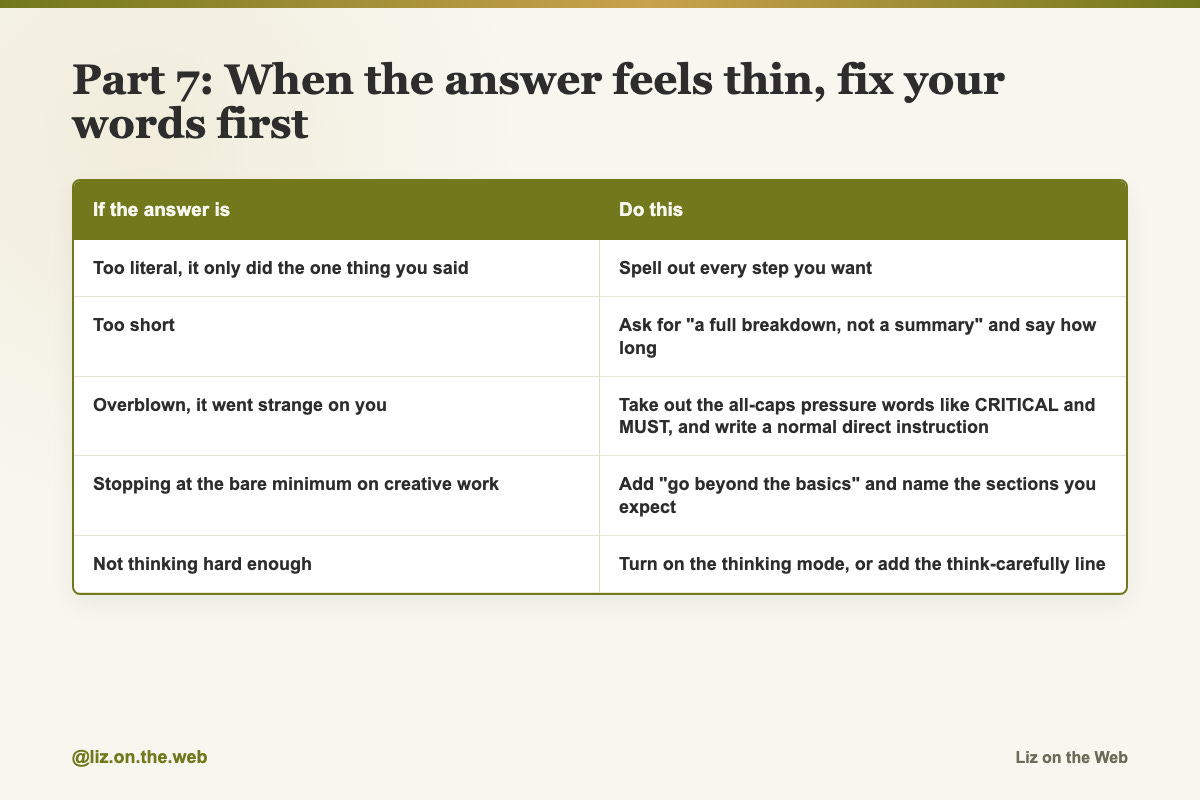
If the answer is / Do this
Too literal, it only did the one thing you said: Spell out every step you want
Too short: Ask for "a full breakdown, not a summary" and say how long
Overblown, it went strange on you: Take out the all-caps pressure words like CRITICAL and MUST, and write a normal direct instruction
Stopping at the bare minimum on creative work: Add "go beyond the basics" and name the sections you expect
Not thinking hard enough: Turn on the thinking mode, or add the think-carefully line
The before-and-after pairs are in the prompts section. Try the same task twice, once each way, and you will see the gap.
Part 8: The part that survives every model change
A new model ships every few weeks. Chasing every one of them is tiring, and it is not where the real gain lives. What makes your AI good is what it knows about you. Your work, your projects, your goals, the way you write, your rules, what you are doing right now.
If all of that lives inside one app, you start from zero every time that app is down, worse at something, or replaced by something better.
So keep it in plain files on your own computer. Make a folder and put three plain text files in it:
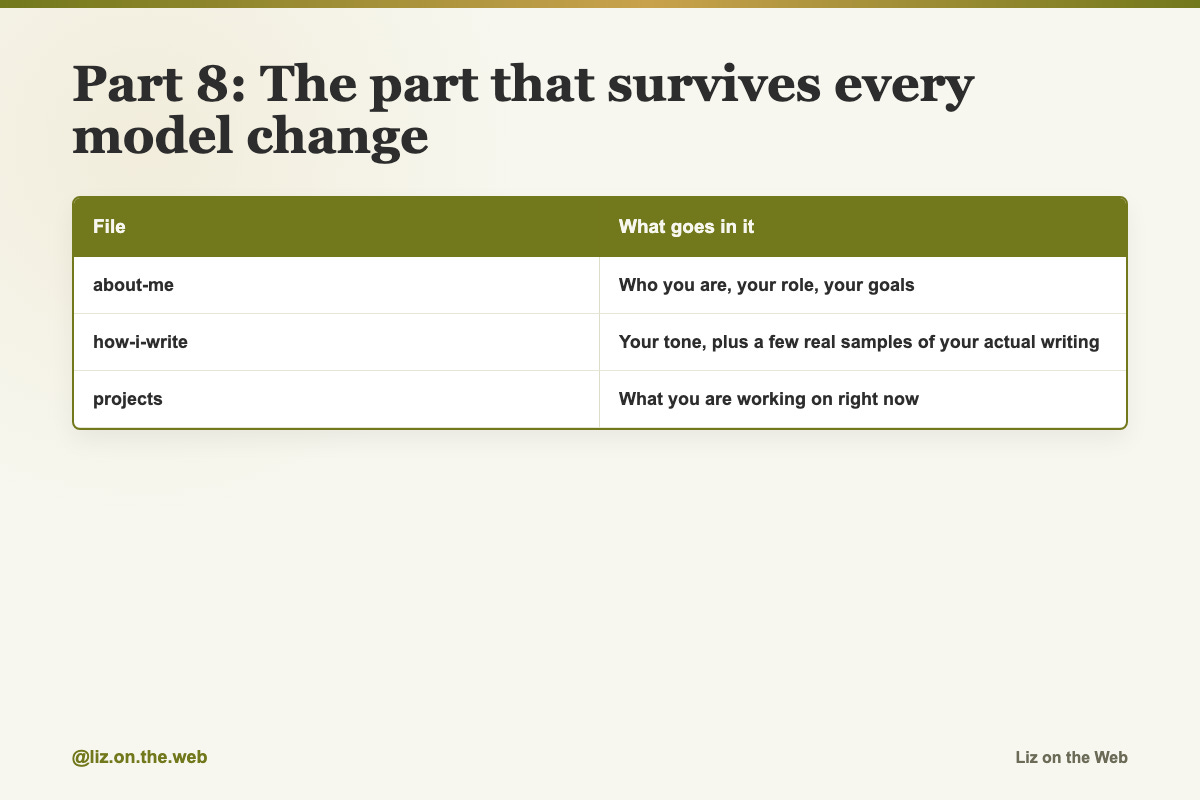
File / What goes in it
`about-me`: Who you are, your role, your goals
`how-i-write`: Your tone, plus a few real samples of your actual writing
`projects`: What you are working on right now
Paste those into any AI before a real request and watch the answer change. Module 5 goes much deeper on this. Ten minutes now is enough to feel the difference.
Reference: what the model names meant
Everything in this table is an example of how the naming worked at the time these guides were written. Every name and number here will drift. The sizes in Part 1 will not.
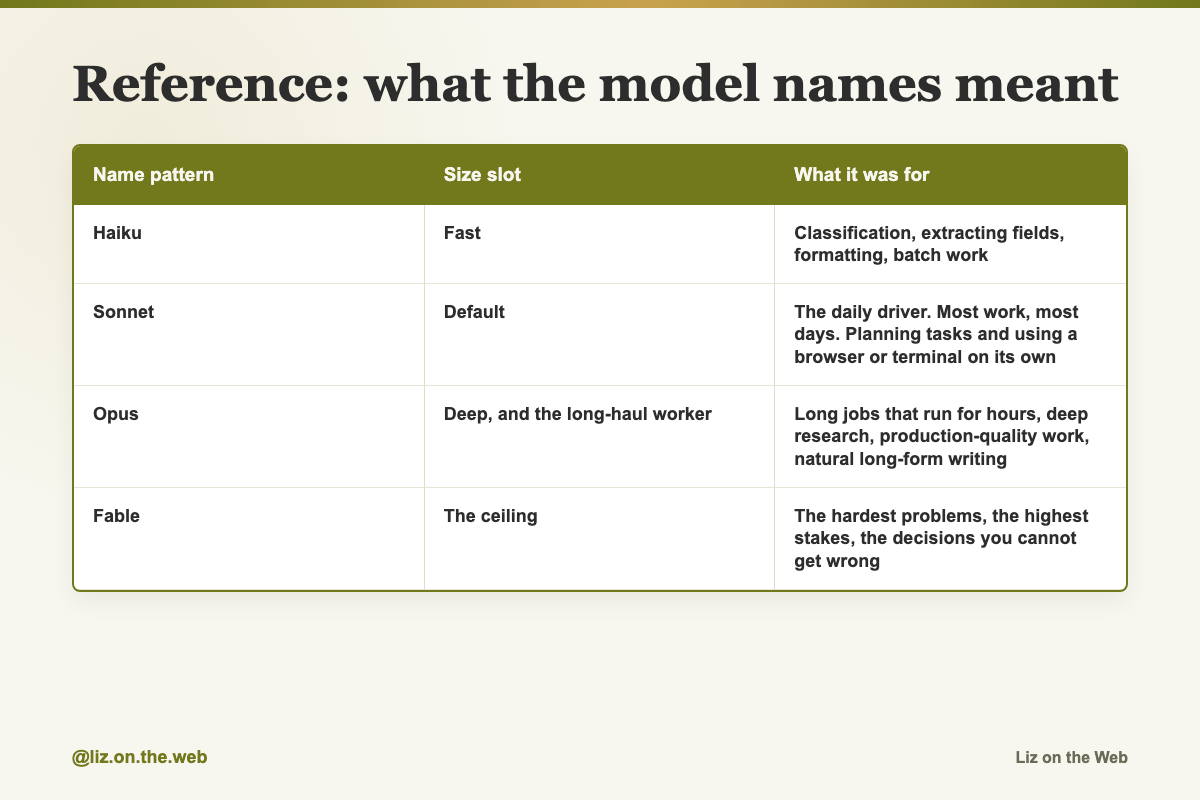
Name pattern / Size slot / What it was for
Haiku
Size slot: Fast
What it was for: Classification, extracting fields, formatting, batch work
Sonnet
Size slot: Default
What it was for: The daily driver. Most work, most days. Planning tasks and using a browser or terminal on its own
Opus
Size slot: Deep, and the long-haul worker
What it was for: Long jobs that run for hours, deep research, production-quality work, natural long-form writing
Fable
Size slot: The ceiling
What it was for: The hardest problems, the highest stakes, the decisions you cannot get wrong
A few details from those releases, kept only because they show you what to look for in the next one:
Version numbers do not line up across sizes. One lineup ran Haiku 4.5 alongside Sonnet 5 and Opus 5, because there was no Haiku 5. Do not assume a matching number exists.
Prices are quoted per million tokens, as input and output. A token is a chunk of text, very roughly three quarters of a word. Those are pay-as-you-go prices for people building on the API. If you use the app on a Free, Pro, or Max plan, a new model does not change your bill. It changes what you can open and how fast you hit your limit.
Published prices disagreed across guides, because some quoted a launch discount and some quoted the standard rate. The rule: never trust a price in a guide, including this one. Open the vendor's own pricing page.
Context windows got large. Around a million tokens became normal at the top, which is roughly a very long book in one go. That is what makes a big model good at the hundred-page contract.
Benchmark scores get quoted a lot and they are tests, not your workload. A model that scores well on fixing real code may still be wrong about your spreadsheet. Use scores for a rough feel, then test on your own real task.
Token counting changed between versions, so the same job could use around thirty percent more tokens on a newer model even at the same price per token. Compare the cost of the whole task, not the sticker price.
Some models hand sensitive topics to a different model on a small share of chats, as a safety feature. If the tone shifts on a touchy subject, that may be why.
New releases come with claims. One release was described as no longer making things up. No model stops making things up. Treat every launch claim as a direction, not a promise, and keep checking the output.
Copy and paste
Your model rule, one page
Keep this where you can pull it up mid-chat. Fill in your own current model names.
MODEL RULE, WHICH ONE TO OPEN

THE ONE RULE:
Don't pick the "best" model, pick the right one for the job.
Capability costs money, so match it to the stakes.

FAST MODEL [name: ____]
Reach for it when the task is simple and you want it instant and cheap:
quick lookups, sorting, labeling, tidying text, bulk repeats.
Never hand it a long document.

DEFAULT MODEL [name: ____]
Reach for it for everyday output: emails, drafts, reports, summaries,
research that needs some thought, normal coding, document work.
This is the tab that stays open. About 80-90% of the week lives here.

DEEP MODEL [name: ____]
Reach for it when the problem is genuinely hard, the reasoning is long,
or the decision is high-stakes and you'd want your smartest advisor in
the room. Strategy, tough analysis, difficult code, research you can't
afford to get wrong.

THE DEFAULT SETUP:
- Live in the default model for almost everything.
- Escalate the moment you're stuck, the stakes are high, or the first
  two answers weren't good enough.
- Drop down to the fast model for bulk, boring, or speed-critical work.
- Turn thinking on for decisions. Turn it off for emails.

HONEST NOTE:
Every model can both reason and produce work. The real choice is top
capability versus best value. When in doubt, start on the default and
only pay up when the problem earns it.
Ten habits that work on any model
These do not care which model you are in. Keep them next to the rule above.
1. ASK FOR 3 OPTIONS.
End any request with "give me three versions: safe, bold, and weird."
You go from one flat answer to a real range in one shot.

2. MAKE IT INTERVIEW YOU.
"Before you answer, ask me the 5 questions you most need answered to do
this well." It gathers context instead of guessing.

3. SHOW IT A GOLD STANDARD.
Paste an example of great work and say "match this quality and format."
AI copies excellence far better than it follows adjectives.

4. TELL IT WHO TO BE.
"You are a [specific expert] with 20 years of experience in [niche]."
A specific role pulls a sharper answer than a blank prompt.

5. SLOW IT DOWN.
"Think through this step by step before you answer." For anything with
logic or numbers, this alone lifts the quality.

6. RUN A RED TEAM.
"Try to prove me wrong. Where does this fall apart?" Turns a cheerleader
into a pressure-tester.

7. USE PROJECTS FOR ANYTHING YOU REPEAT.
Put your context, rules, and examples in a Project once, and every chat
inside it already knows your world.

8. BUILD A SKILL FOR ANY REPEATED TASK.
If you explain the same process twice, turn it into a Skill so you never
explain it again.

9. LET IT SEE.
Paste a screenshot and ask "what's off here?" AI reads design,
dashboards, and error messages straight from an image.

10. KEEP A MEMORY FILE.
Keep a running note of how you work and your preferences, and paste it at
the top of big tasks so the output sounds like you, not like a stranger.

WHICH MODEL FOR THESE:
Run the everyday ones on your default model. Escalate the hard ones.
Deep research report
Switch to your deep model first. Use this when you want wide research turned into something you can decide from.
Create a deep research report on [topic].

Use the context I provide and any research tools available to you.

Organize the report so I can make a decision from it.

Include:
- The main findings.
- The strongest evidence.
- Open questions.
- Risks or caveats.
- A clear recommendation based only on the evidence.
Make sense of a giant document
For a long contract, report, transcript, or PDF. Deep model.
Read this full document: [attach or paste document].

Do not skim.

Give me:
- The plain-English summary.
- The most important details.
- Anything risky or confusing.
- The parts I should read myself.
- The questions I should ask next.
Plan and build a real project
For a big multi-step build where the pieces have to stay connected.
Help me plan and build [project].

Here is the full context: [paste goals, constraints, files, users, deadline, and requirements].

First, make the plan.

Then break it into steps.

Then work through the steps without losing the full goal.

Stop and ask me only when you need a decision I have not given you.
Turn a pile of notes into a plan
For a year of notes, voice transcripts, or brain dumps you never processed.
Read all of these notes: [paste or attach notes].

Find the patterns I am too close to see.

Turn them into:
- The main themes.
- The decisions I keep avoiding.
- The ideas worth acting on.
- The ideas to drop.
- A simple plan for the next phase.
Untangle a mess
For the process, spreadsheet, or system nobody understands anymore.
Untangle this system: [describe or attach the messy process, spreadsheet, migration, or workflow].

First, map what is happening now.

Then find the failure points.

Then give me the cleanest path to fix it.

Include:
- What to do first.
- What not to touch yet.
- What could break.
- How to verify each step worked.
Upgrade one saved instruction (copy and paste version)
Move 1, one at a time, in any AI app. Safe for beginners.
Here is one of my skills, or my Project's custom instructions. Make it dramatically better.

1. Tell me in one line what it is for.
2. Audit it hard. Where is it vague, incomplete, or likely to give inconsistent results? Look for missing context, undefined terms, no examples, no defined output format, and no rules for what it should never do.
3. Rewrite it into a sharper version with specific instructions, a clear step-by-step process, the exact output format I want, one or two concrete examples of a great result, and explicit rules for what it should never do. Keep my voice and intent.
4. In a few bullets, tell me what you changed and why it will perform better.

Give me the upgraded version as one clean, copy-paste-ready block so I can drop it straight back in.

Here it is:

[paste one skill, or your Project's custom instructions, here]
Upgrade every instruction file at once (files version)
Move 1, for when your instructions live in files an AI can edit. Copy the whole folder to a safe place before you run this. It rewrites files directly and it is told not to stop and ask.
Go through every skill, workflow, and instruction file in this project: my CLAUDE.md, everything in .claude/skills, and my subagents in .claude/agents. Read each one, then for each:

1. Tell me in one line what it is for.
2. Audit it hard. Where is it vague, incomplete, or likely to give inconsistent results? Look for missing context, undefined terms, no examples, no defined output format, and no rules for what it should never do.
3. Rewrite the file in place to fix all of that: specific instructions, a clear step-by-step process, the exact output format it should produce, one or two concrete examples of a great result, and explicit do-nots. Keep my intent and my voice.

When you are done, give me a short summary of what you changed in each file, tell me which skills overlap or should be merged, and name the one skill or workflow I am clearly missing for the kind of work I do. Don't ask me anything until you have done all of this.
Capture a stuck chat
Move 2, step 1. Run this inside the conversation where you got stuck.
Turn this entire conversation into a single, complete markdown handoff so I can paste it somewhere fresh and a new AI can pick up with zero prior context and full understanding.

Use these headers:
- Goal: what I am actually trying to accomplish, and what outcome it affects.
- Current state: what exists right now, what is working, what is not.
- What we have tried: every approach we attempted and exactly what happened with each one, including the precise errors, dead ends, and anything we ruled out and why.
- Constraints and rules: anything that must stay true, the tools I am using, things I cannot change.
- Key details: the specific files, names, numbers, links, or snippets that matter.
- Where I am stuck: the exact roadblock, described precisely.

Be thorough and specific. Do not summarize away any detail a fresh AI would need to actually solve this. Output only the markdown block, nothing else.
Solve it in a fresh chat
Move 2, step 3. New chat, deep model, effort high, then paste the handoff into this.
Below is the full context of a problem I have been stuck on. I moved it into a fresh chat on your most capable settings so you have room to actually solve it.

Do this:
1. Diagnose the REAL root cause of the roadblock, not just the surface symptom. If my own assumptions about what is wrong look mistaken, say so directly.
2. Lay out the 2 to 3 best ways to solve it with the tradeoffs of each, then pick the one you would actually do, and why.
3. Then either fully solve it and give me the finished result, or, if it genuinely cannot be finished in one pass, complete as much as you can and give me the next three concrete steps in order.

Rules:
- Only stop to involve me if a payment, a login, or a decision that is truly mine to make is required. Otherwise keep going and solve it. Do not ask me questions you can reasonably answer yourself.
- Do not violate any of the constraints or rules listed in the context.
- Lead with the solution, then show your reasoning briefly so I can follow it.

Here is the full context:

[paste the markdown from the capture prompt here]
Build a plan a cheaper model can run
Move 3, step 2. Deep model, effort high.
You are my strategist. Build me a detailed, durable [content plan / project roadmap / launch plan] for [describe the goal, the timeframe, and any context] that I can execute against for the next few months.

Important: I am going to build this once with you now, then have a cheaper, less capable AI actually run it day to day. So it has to be clear and specific enough that a simpler model could follow it without you.

Include:
1. Strategy: the overall approach and the single most important outcome we are driving toward.
2. Phases: the major phases in order, each with one clear goal.
3. Tasks: inside each phase, the specific tasks or deliverables, broken down small enough to hand to a simpler AI one at a time.
4. Acceptance criteria: for every task, spell out what "done well" actually looks like, so it is obvious when a piece is truly finished and not just technically done.
5. Inputs and risks: what I will need, including tools, assets, and info, plus the bottlenecks or risks to watch for.
6. Rhythm: a simple weekly or daily cadence so I always know exactly what to work on next.

Make it specific to my situation, not generic filler. Before you build it, ask me up to five sharp questions that would make the plan meaningfully better, then deliver the full plan.

Here is my context:

[paste your niche, audience, offer, current numbers, timeline, and any constraints]
Hand one step to a cheaper model
Move 3, step 3. Use this every time you want the next piece done.
Here is a plan my most capable model built. Execute the next step exactly as written, meet its acceptance criteria, and flag anything that does not line up with the plan. Do not redesign the strategy, just run it well and give me the finished deliverable.

Here is the plan, and the step I want done:

[paste the plan, and name the step]
Ask for uncertainty
Add to anything you are going to rely on.
Give me the answer and flag anything you're not sure about with a confidence score.Ask it not to guess
Use on factual questions.
If you don't know, say you don't know. Do not guess.Ask it to mark risky facts
Use before you copy anything into a document you will send.
Mark any specific fact (number, date, quote, name) that you'd want me to verify before using.Stop the flattery
Use when the answers keep opening by agreeing with you.
Do not flatter me or agree by default. Push back if I'm wrong.Prompt fixes, before and after
Five pairs. The first line in each pair is the version that produces a thin answer.
Too vague:
Clean up this draft.Better:
Fix any typos, tighten any sentence over 25 words, and remove anything unnecessary. Keep the structure.Too small an ask:
Summarize this.Better:
Give me a full breakdown of this in 3-4 paragraphs, not a summary. Cover the main argument, the evidence, and the counterargument.Too shouty:
CRITICAL: You MUST use the calculator tool for ANY math.Better:
Use the calculator for math problems.Too thin for creative work:
Design a landing page for my app.Better:
Design a landing page for my app. Go beyond the basics. Include hero, social proof, feature breakdown, pricing, FAQ, and a final CTA.Not thinking hard enough:
Think carefully through the problem before responding.Terminal commands
If you use the terminal version of Claude, these two switch the model and the effort.
/model/effort highWatch out
You open the deep model by default
It feels responsible. It is expensive, slower, and on routine work it can be worse, because it over-explains and adds complexity you did not ask for. Default first.
You never open the deep model because it costs more
The usage cost is real, and so is the quality gap on genuinely hard problems. If you are making a real decision, ten minutes of a deep model with thinking on is worth the spend.
You switch models instead of fixing the brief
Two thin answers in a row usually means a thin ask. Add context, say who it is for, say what good looks like, and try the same model again before escalating.
You hand a long document to the fast model
It will not warn you. It will summarize confidently and drop the middle. Long files go up a size.
You leave effort on max
It is a switch you flip for a hard job, then flip back. Left on, it burns your limit on emails.
You let an AI rewrite all your files in one pass
The bulk upgrade prompt in this lesson edits every instruction file in a project and is told not to stop and ask. Copy the folder somewhere safe first. Review every change before you keep it. There is no undo.
You trust a confident answer on facts
Confidence is not accuracy. Add an uncertainty line to anything with a number, date, quote, or name in it, and check the ones it flags.
You build a plan only your best model can run
If the steps are vague, the cheap model will guess and you will not find out until the work comes back wrong. Force acceptance criteria on every task. That is what makes a plan portable.
You read a model name as a permanent rule
Every name in the reference table will be replaced. Check the vendor's current model page and pricing page before you make a decision based on either.
Check yourself
[ ] I can name the three questions and answer them without notes.
[ ] I know which model my app opens by default, and I chose it on purpose.
[ ] I found the effort or thinking setting in my app, or confirmed my model handles it by itself.
[ ] I escalated one task only after two thin answers, not on a hunch.
[ ] I ran the capture prompt on a stuck problem and solved it in a fresh chat.
[ ] I upgraded at least one saved instruction with my deep model.
[ ] I copied any folder to a safe place before letting an AI edit it.
[ ] I added an uncertainty line to one factual request.
[ ] I made the three context files and pasted them into one real request.
Do this now
Take the problem you have been stuck on for weeks. Open that old chat, run the capture prompt, then paste the result into a brand new chat on your deep model with effort turned up, and run the solve prompt.
Keep going
Next in AI for Entrepreneurs:
Part 9: ChatGPT and Claude, compared fairly
Part 10: Your starter stack, and what to ignore
Part 11: Day one: the five things to do first
Every part of this course sits in reading order in the free AI for Entrepreneurs course outline.
This part is free, start to finish. Subscribing keeps the rest of the course coming and opens the paid parts.
Tell me in the comments the task you have been running on the wrong setting, and I will point you at the right next part.