
You found a model you like. You use it for everything. Short questions, long documents, quick lists, and hard decisions, all in the same window.
So you overpay on easy work and get thin answers on hard work, and you never notice either one, because it is the same box every time. You also let the thing that built your work be the thing that checks it, which is the one job it is worst at.
What you will be able to do
Name the three model sizes and say what each one is for.
Switch models inside your AI app in under a minute.
Turn a thinking mode on and off, and know when it is worth it.
Split one real job into think, build, and check, using a different model for the check.
Read a guide with old model names in it and still use the advice.
This is for anyone who has seen a model dropdown and never touched it. No technical knowledge needed.
The proof behind this
Liz Elliott built four software products with AI help: PRISM, AutoViral, UPRISE Social Studio, and Profounder, and she is not an engineer. Running work across different models, instead of one favorite, is how a non-technical person ships software.
What this lesson is
Lesson 2.1 of the free AI for Entrepreneurs course, in Module 2: Choosing Your AI.
A model is one brain, not one brand. Anthropic makes Claude. OpenAI makes ChatGPT. Google makes Gemini. Inside each of those brands sit several models. They are not just older and newer versions of one thing. They are different sizes, built for different jobs.
Think about a kitchen. You own a small pan and a big pot. The big pot is not better. It is bigger. You do not boil one egg in the big pot, and you do not make soup for twelve people in the small pan. You pick by the job.
Every AI company sells about the same three sizes. A small fast one for simple, high volume work. A middle one for most of your day. A big slow one for hard thinking. The names change all the time. The three sizes stay.
That is the part worth learning. Model names turn over every few months. Prices change. New ones ship. If you memorize the names, your notes go stale. If you learn the sizes, you can drop any new model into the right slot the week it comes out.
The trap is picking a favorite. When you have one favorite, you use it for everything. So you overpay on easy work and you get thin answers on hard work. People who are good at this do not have a favorite. They have a rule for which one they open.
There is one more habit that matters as much as the sizes. When a model builds something, it is bad at checking its own work. It made the same guesses on the way in and on the way out. Ask it to review itself and it will often say the work looks great. A different model reads it cold, with no attachment to how it got made. Same reason a friend catches the typo you read past ten times.
New here? Use the free AI for Entrepreneurs course outline to read this series in the best order.
Do it
Part 1: Learn the three sizes
Every big AI company sells these three. Learn this table and you can ignore the names.
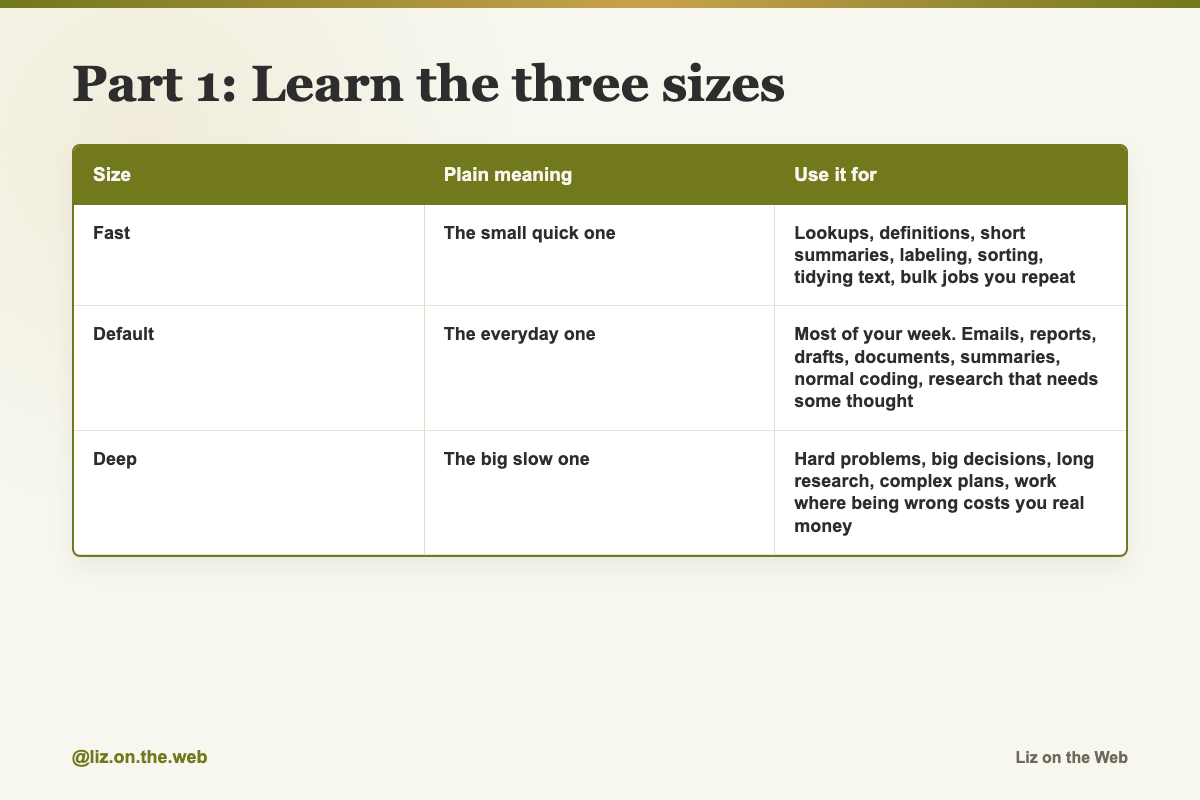
Size / Plain meaning / Use it for
Fast
Plain meaning: The small quick one
Use it for: Lookups, definitions, short summaries, labeling, sorting, tidying text, bulk jobs you repeat
Default
Plain meaning: The everyday one
Use it for: Most of your week. Emails, reports, drafts, documents, summaries, normal coding, research that needs some thought
Deep
Plain meaning: The big slow one
Use it for: Hard problems, big decisions, long research, complex plans, work where being wrong costs you real money
The names attached to those sizes when this course was written are in the reference table at the end of lesson 2.3. Treat them as examples. They will change.
One rule beats all the others: when you are not sure, use the default one. It is strong enough for thinking work and fast enough for daily use. Most people should run about eighty percent of their week there.
Part 2: Find the model picker
You switch models inside a chat. It takes a few seconds.
Open any chat in your AI app.
Look at the top of the chat. You will see the name of the model you are using right now.
Click that name. A list opens showing every model your plan can use.
Pick one. The chat uses it starting with your next message.
If the picker is not at the top of the chat in your version, look in the app's settings. App menus move. The picker itself has stayed in every version so far.
What you see in that list depends on what you pay for. Free plans usually get the fast one and the default one. Paid plans add the deep one, with tighter limits on how much of it you get. Higher paid tiers give you more of the deep one. If a model you read about is missing from your list, that is why.
Part 3: Turn thinking on when the job needs it
Most AI apps also have a thinking mode. It is a mode, not a model. You switch it on top of whatever model you picked.
With it on, the model works through the problem step by step before it answers. You can usually watch that thinking happen. The answer takes longer and it catches things a fast answer misses.
To turn it on:
Pick the default or the deep model first.
Look at the lower left of the box you type in.
Click Search and tools.
Turn on Extended thinking.
Turning it on may start a new chat, so finish what you are doing first. If your app words it differently, look for anything called thinking, reasoning, or think longer. If you cannot find a toggle at all, you can ask for the same behavior in words. Add this to your prompt: Think through this carefully before responding.
Use it when you have gone back and forth on a decision, when a problem has several competing pieces, or when you want to see the reasoning and not just the answer. Skip it for emails, summaries, and quick questions.
Turn it off when you are done. Leaving it on burns your usage limit on simple work for no gain.
Part 4: Run the three-model workflow
This is the habit that separates strong AI users from everyone else. One job, three steps, three different models.
Think. Open your deep model. Ask it to plan the approach, break the problem into parts, and decide how the work should happen. Do not let it start building. You want the shape of the job first. Speed does not matter here.
Execute. Switch to a fast strong model. The hard thinking is done. This step is writing, building, formatting, turning the plan into a real draft. You do not need your deepest thinker to follow a plan that already exists.
Review. Copy the finished work into a chat with a different model. Not the one that built it. Paste the goal, paste the work, and run the review prompt below.
Moving work between models is plain copy and paste. Copy the plan out of chat one, paste it into chat two. Nothing clever.
Step 3 is the one most people skip, and it is the one that saves you. A fresh model has different blind spots. It notices the gaps the first one talked itself past.
Part 5: Stop wasting your limit
These five habits work on every model and every plan.
Edit your last message instead of sending "no, try again." Hover over your last message, click the edit pencil, and change the prompt. Editing forks the chat, so the bad answer does not stay in the conversation as extra baggage.
Batch tasks into one message. Three tasks in one message costs less than three separate messages. Use a numbered list.
End simple prompts with "No commentary. Just the output." It cuts the intro, the summary, and the offer to help further. On short tasks that can cut the answer length by a third or more.
Start a new chat for a new topic. A long chat carries all the old context forward, and the app reprocesses it every message. New topic, new chat.
Do not upload a long PDF when the text will do. PDFs carry layout data that costs more to read. For long or dense files, paste the plain text into the chat instead.
Part 6: Write your own rule
Run the model audit prompt below in your default model. It maps your actual work to the sizes and hands you back a short personal rule. Save that rule somewhere you can see it. Three or four sentences is enough.
Copy and paste
The review prompt
Use this after one model builds something. Paste it into a chat with a different model.
Review this work cold. Look for mistakes, missing pieces, weak assumptions, confusing parts, and places where it does not match the goal. Be direct and specific. Do not rewrite the whole thing yet. First, tell me what is broken and what should change.

Goal:
[PASTE THE GOAL]

Work to review:
[PASTE THE WORK]
The model audit prompt
Use this once, to build your own rule for which model you open.
I want to figure out how to use AI models more strategically for my specific work.
What I do:
[your job title and 2-3 sentences about what my day-to-day work actually involves]
How I currently use AI:
[what I use it for most, and which model I default to]
My biggest bottleneck:
[what's taking the most time or where the output has felt shallow]
Based on this, I want you to:
1. Audit my current model usage.
Given how I described my work, am I using the right model for the right tasks? Where am I likely wasting the deep model on things the default model handles just as well? Where am I using the default model on things that would genuinely benefit from deeper reasoning?
2. Map my specific tasks to the right model.
Take the types of work I described and tell me, for each major task category, whether that's a fast-model task, a default-model task, a deep-model task, or somewhere I should turn on extended thinking. Be specific to my role, not generic.
3. Tell me the 3 tasks in my role where extended thinking would make the biggest difference.
Not general advice. Specific to what I described. These should be tasks where seeing the reasoning step by step would genuinely change the quality of the output or help me think something through more clearly.
4. Give me a simple personal model policy.
Write me a 3-4 sentence rule of thumb I can actually remember, tailored to my specific role and work style, for when to use the fast, default, and deep models, and when to turn on extended thinking.
Be specific to my situation. The point of this exercise is to stop using models on autopilot.
The thinking line
Add this to a prompt when you cannot find a thinking toggle, or when the task involves logic or numbers.
Think through this carefully before responding.The output trimmer
Stick this at the end of any simple request to cut the padding.
No commentary. Just the output.The batching pattern
Use this shape when you have several small asks about the same thing.
1. Rewrite this email.
2. Make it shorter.
3. Give me 3 subject lines.
The shape to remember
Save this line. It survives every model launch.
smartest to think, fastest to build, a different one to review, cheapest for the boring stuffWatch out
You use the biggest model for everything
The deep model on a short email works fine. It is just an expensive way to write a short email, and it eats the part of your limit you wanted for the hard job later in the week. Default for most things. Deep when the work earns it.
You let the builder check its own work
It made the same assumptions twice, so it will tell you the work looks great. Hand the output to a different model. This matters most on anything you are going to send, publish, or make a decision from.
You memorize model names
Guides go stale within months. The version numbers you read this year will be wrong next year. Learn fast, default, and deep. When a new model ships, ask which of the three slots it fits and carry on.
You hand a long document to the fast little model
Small fast models lose track of detail across a long file. They will not tell you. They will quietly miss things in the middle. Long documents go to the default or the deep model.
You blame the model when your brief was thin
A lot of weak output comes from a weak ask. Before you switch models, give the one you have more context. Say what you want, who it is for, and what a good version looks like. Then try again.
You leave thinking mode on
It is a switch, not a setting you turn on once. Left on, it spends extra effort on simple work. Turn it off when the hard task is done.
Check yourself
[ ] I can name the three model sizes without looking.
[ ] I found the model picker in my app and switched models once.
[ ] I turned extended thinking on, used it, and turned it off.
[ ] I ran one real job through think, build, and review with three chats.
[ ] The review used a different model than the build.
[ ] I ran the model audit prompt and saved the rule it gave me.
[ ] I know which models my plan actually includes.
Do this now
Take the last real piece of work an AI made for you. Open a chat with a different model, paste the review prompt, fill in the goal and the work, and read what it finds.
Keep going
Next in AI for Entrepreneurs:
Part 7: The four Claudes, and which one you actually want
Part 8: Fast or deep: picking a model per task
Part 9: ChatGPT and Claude, compared fairly
Every part of this course sits in reading order in the free AI for Entrepreneurs course outline.
This part is free, start to finish. Subscribing keeps the rest of the course coming and opens the paid parts.
Tell me in the comments which model you have been using for everything, and I will point you at the right next part.