
You signed up for the clever one. You used it twice. It is eleven dollars a month, it renews on the ninth, and you have not opened it since spring.
Do that six times and your AI bill beats your phone bill while your work looks exactly the same. Meanwhile the apps you already pay for shipped AI features you never switched on, so you are paying twice for things you own.
What you will be able to do
Name the six jobs a working AI stack has to cover, and which tool you use for each.
Apply one rule that tells you whether a subscription stays or goes.
Turn on AI features inside apps you already pay for, without buying anything.
Set up your main AI so it knows who you are and can reach your email, calendar, and files.
Ignore most AI news on purpose and still not fall behind.
This is for anyone whose AI spending grew faster than their AI results. You need about five tools, and two of them are probably free.
The proof behind this
Liz Elliott runs 33 active social brands and her whole operation runs on AI automations across several computers. That is not 33 tools. It is a small stack, used hard, wired together.
What this lesson is
Lesson 2.5 of the free AI for Entrepreneurs course, in Module 2: Choosing Your AI.
There are thousands of AI tools. You need about five, and two of them are probably free.
The trap is collecting. You see a tool, it looks clever, you sign up, you use it twice, and now you pay eleven dollars a month forever for a thing you forgot about. Do that six times and your AI bill is bigger than your phone bill and your work has not changed.
The fix is to stop shopping for tools and start naming jobs. A working setup covers a small number of distinct jobs, and each tool owns exactly one of them. Getting information in. Thinking and building. Looking things up with sources. Capturing meetings. Making visuals. Keeping the output somewhere you can find it.
Once you think in jobs, the shopping question changes. Instead of "is this tool good," you ask "which job does this do, and what am I currently using for that job." Two tools fighting over one job is waste. A job with no tool on it is a hole.
Here is the rule that keeps the list short. A subscription earns its place if you can name the one specific thing it replaced. Not "it helps." What did it replace, and what would you have to go back to doing by hand if you cancelled it tomorrow? If you cannot answer in one sentence, it goes.
And before you buy anything, check what you already have. Most of the apps you already pay for quietly shipped AI features in the last couple of years. You may be paying twice for something you already own.
From Liz's playbook: Liz Elliott runs 33 active social brands and her whole operation runs on a set of AI automations across several computers. That is not thirty-three tools. It is a small stack, used hard, wired together.
New here? Use the free AI for Entrepreneurs course outline to read this series in the best order.
Do it
Part 1: Apply the keep-or-cut rule
Open your bank statement or your app store subscriptions and list every AI tool you pay for. For each one, finish this sentence out loud: "If I cancelled this tomorrow, I would have to go back to ___."
If you cannot finish the sentence, cancel it today. If you can, write the answer down. That sentence is why the tool exists, and it is the thing to check again in six months.
Do this before you add anything from the rest of this lesson.
Part 2: Set up the hub
One tool is the middle of the stack. Everything else either feeds it information or catches what comes out. For most people that is the main chat AI you already use.
Set it up properly once. It takes a couple of minutes and it changes every answer after it.
Create an account at
claude.ai, or download the desktop or mobile app.Go to Settings, then Memory, and turn it on.
Tell it your name, your job, and how you like things written.
Go to Settings, then Connectors.
Link your Google account so it can read email, check your calendar, and search your Drive.
Menu wording moves between versions. If those exact words are not there, look for anything called memory, personalization, connectors, or apps.
Three more things worth doing in the hub:
Build a Project for your work. Load in your role, your goals, your clients, and the documents you keep re-explaining. Every chat inside that Project starts already knowing all of it.
Set your standards once. Something like:
Push back when I am wrong. No jargon. Keep it under 150 words.It holds those across everything after.Stop using it like a search engine. It works best when you hand it real context and ask for real work, not when you type five words and hope.
Connectors are the line between an AI that talks about your work and one that reaches in and does something. Before you link anything, know what you are giving access to. Email and Drive are your whole life. Grant one at a time and see how it goes.
Part 3: Cover the six jobs
Here is the stack by job. Pick one tool per row. Two tools in one row is waste.
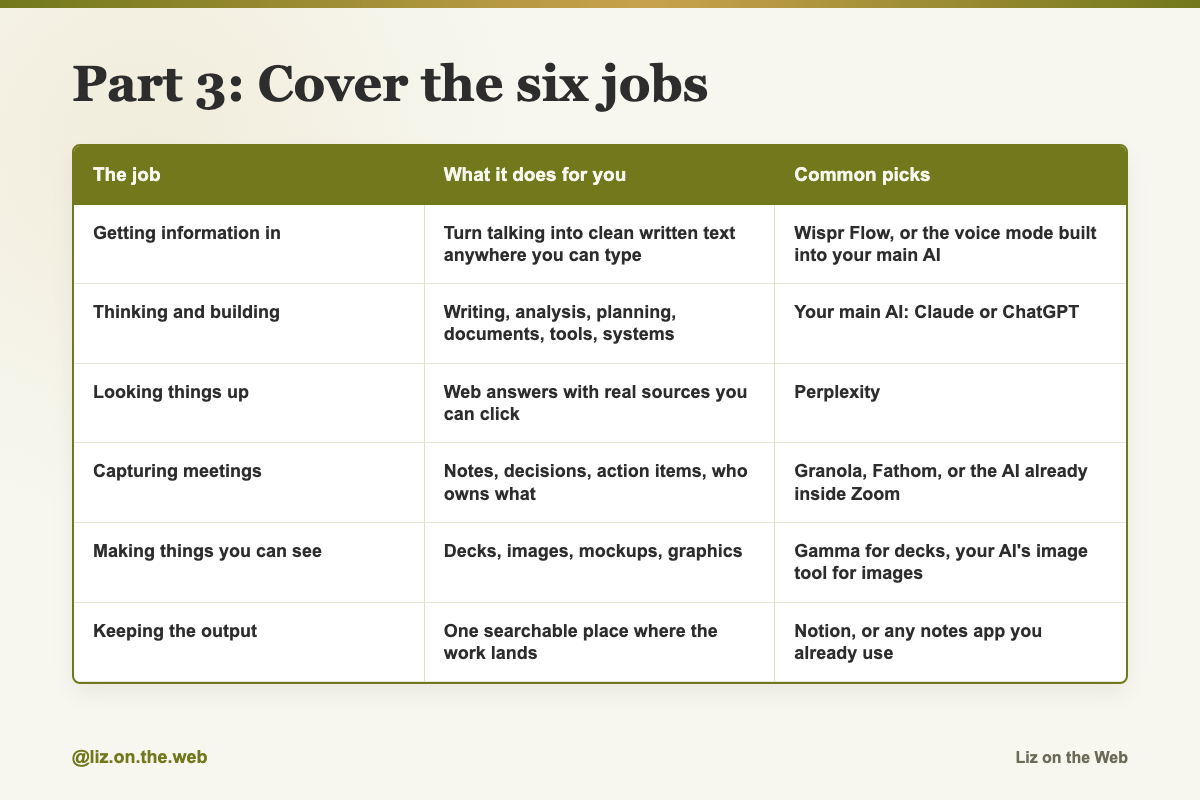
The job / What it does for you / Common picks
Getting information in
What it does for you: Turn talking into clean written text anywhere you can type
Common picks: Wispr Flow, or the voice mode built into your main AI
Thinking and building
What it does for you: Writing, analysis, planning, documents, tools, systems
Common picks: Your main AI: Claude or ChatGPT
Looking things up
What it does for you: Web answers with real sources you can click
Common picks: Perplexity
Capturing meetings
What it does for you: Notes, decisions, action items, who owns what
Common picks: Granola, Fathom, or the AI already inside Zoom
Making things you can see
What it does for you: Decks, images, mockups, graphics
Common picks: Gamma for decks, your AI's image tool for images
Keeping the output
What it does for you: One searchable place where the work lands
Common picks: Notion, or any notes app you already use
A seventh job shows up if you study or research a lot: turning documents, papers, and videos into something you can actually absorb. NotebookLM does that. Upload a chapter, a report, or a video, and get flashcards, a quiz, a study guide, or a spoken overview with two AI hosts talking through it.
A few notes on the rows.
Getting information in is the cheapest big win and the one people skip. Most people talk far faster than they type, and when you type you unconsciously shorten what you were about to say. Less context in, worse answer out. Voice mode is built into the main AI apps and costs nothing. A dedicated tool like Wispr Flow goes further, because it works in every app, not just the AI one, and cleans up the filler words as it goes. Set an activation shortcut, hold it, talk, let go, and clean text appears where your cursor is. Free tiers here are usually word-capped, so if it clicks you will hit the cap quickly.
Looking things up is a genuinely different job from thinking. Your main AI is not a search engine. A search AI reads live pages and hands you an answer with links you can check. Use it for product comparisons, current facts, market and competitor questions, and anything where you need to see the source.
Capturing meetings comes with a rule that no tool will remind you of. Tell people you are recording, and get their agreement, before the tool starts. Recording laws differ by country and by state, and workplace policies differ too. This is on you, not on the app. Also read the notes before you share them. Meeting AI regularly misattributes who said what and invents action items nobody agreed to.
Keeping the output matters more than it sounds. Chat histories are where good work goes to die. You had a great planning session three weeks ago and now you cannot find it. Make one page per project and dump every useful output into it. Boring, and it compounds fast. Then connect that place back to your AI so it can read your own material instead of the internet's.
Part 4: Turn on the AI you already pay for
Before you buy a single new thing, check these five. Some are free, some are included in plans you already have.
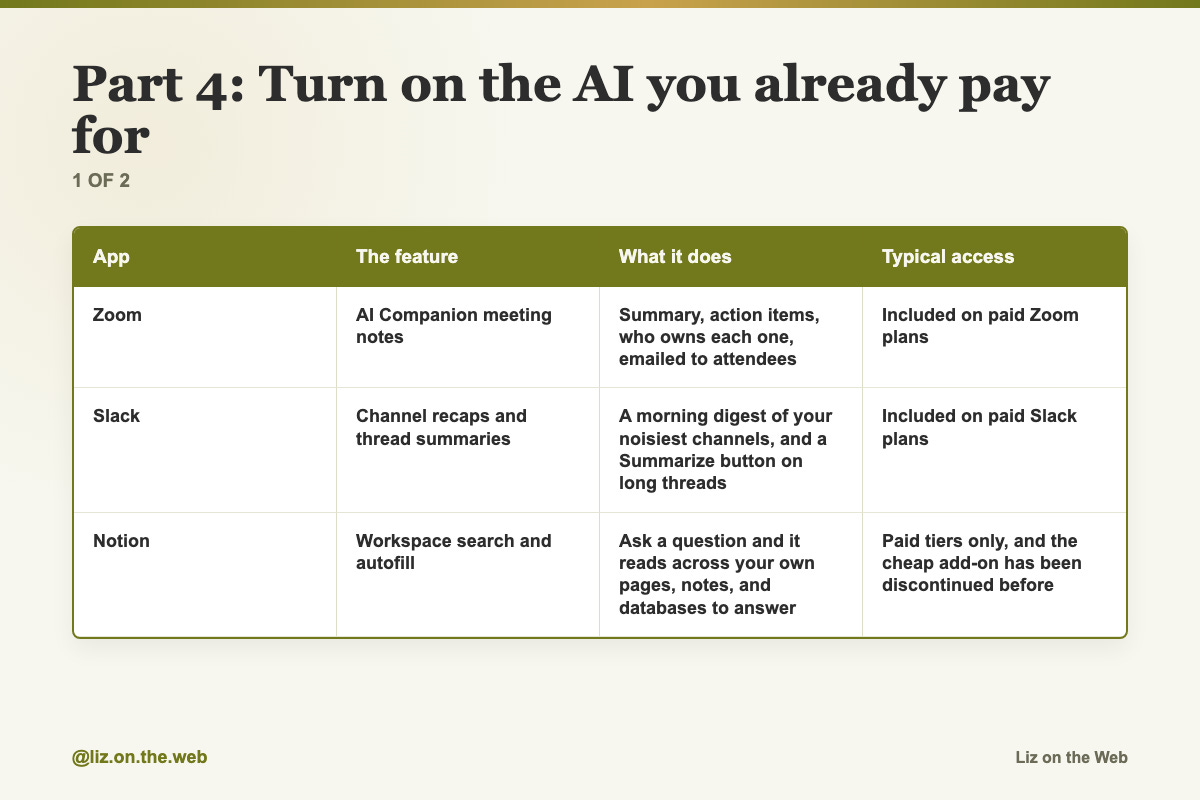
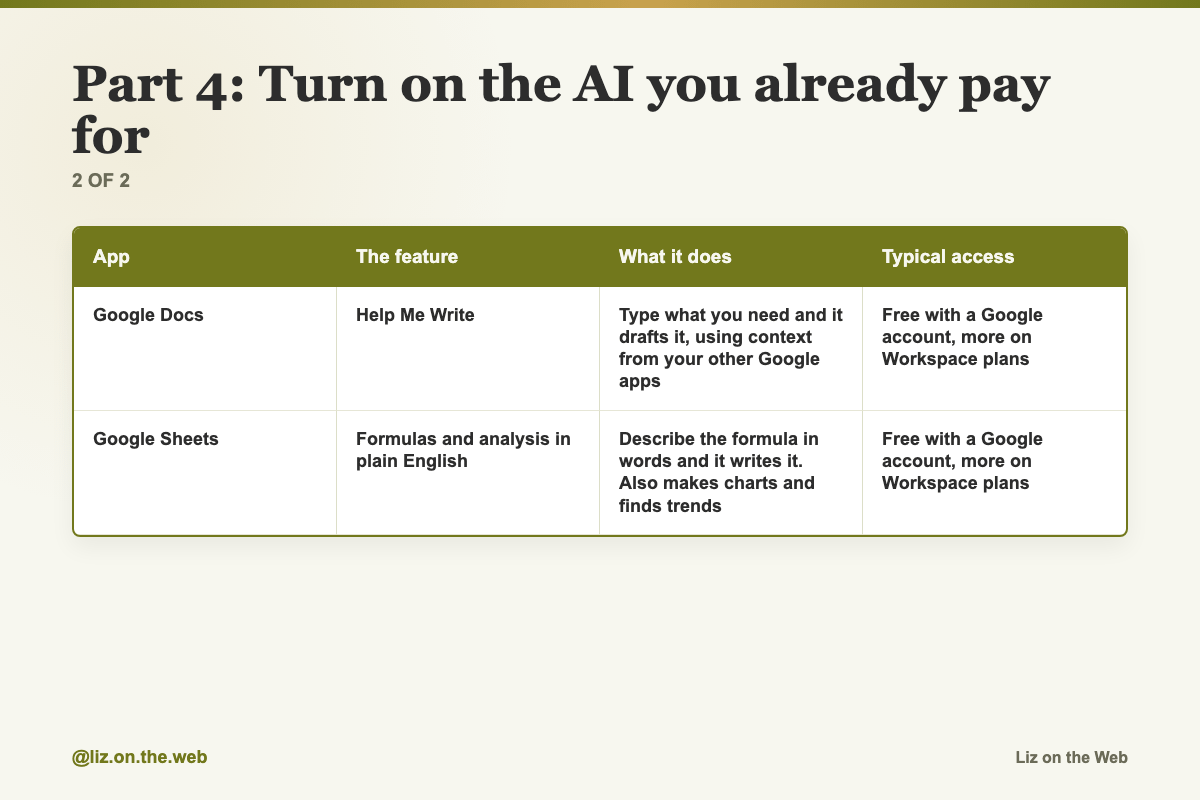
App / The feature / What it does / Typical access
Zoom
The feature: AI Companion meeting notes
What it does: Summary, action items, who owns each one, emailed to attendees
Typical access: Included on paid Zoom plans
Slack
The feature: Channel recaps and thread summaries
What it does: A morning digest of your noisiest channels, and a Summarize button on long threads
Typical access: Included on paid Slack plans
Notion
The feature: Workspace search and autofill
What it does: Ask a question and it reads across your own pages, notes, and databases to answer
Typical access: Paid tiers only, and the cheap add-on has been discontinued before
Google Docs
The feature: Help Me Write
What it does: Type what you need and it drafts it, using context from your other Google apps
Typical access: Free with a Google account, more on Workspace plans
Google Sheets
The feature: Formulas and analysis in plain English
What it does: Describe the formula in words and it writes it. Also makes charts and finds trends
Typical access: Free with a Google account, more on Workspace plans
How to reach them:
Zoom: click the sparkle icon during your next meeting. That turns on AI Companion. It listens to the call and writes the summary at the end.
Slack: click Summarize on a long thread. For the daily digest, look in Slack's AI settings for channel recaps.
Notion, Docs, Sheets: these move around. In Notion, press Space on an empty line, or highlight text and click Ask AI. In Docs and Sheets, look for the AI or Help Me Write option in the toolbar or side panel.
Do not turn on all five at once. Pick the app you spend the most time in, turn on its one feature, and use it once today. Come back for the rest later.
The same consent rule applies to Slack huddle transcription and any workspace-wide search. Know what your team has agreed to before you switch on something that reads across everyone's messages.
Part 5: Spend money like an adult
Four rules, in order.
Start on the free tier every time. Most of these have one. Use it until it stops being enough.
When you pay, start at the cheapest tier that does the job. The standard paid tier of a main AI has been around twenty dollars a month for a long time. Heavier tiers run several times that. Prices move, so check the vendor's own page before you buy. Nothing in this lesson is a current price.
Upgrade as a reaction, not as a hope. The right reason to move up a tier is that you keep hitting limits in the middle of real work. Wanting to be the kind of person who has the big plan is not a reason.
Run one AI for a month before you pay for a second. Notice where it keeps letting you down, and let that pick the second one. One paid plan plus one free account on the other side still gets you a second opinion for nothing.
Add the whole list up before you commit. Six tools at twenty dollars is a real bill, and the guides that recommend them almost never do the arithmetic for you.
Part 6: Ignore most of the news
New models and new features ship constantly. Reading every announcement feels like keeping up and is mostly a way to avoid doing the work. Almost all of it is a version number.
Here is the filter. A change is worth your attention only if it changes what you can hand over. Everything else is a footnote.
By that test, a small number of real shifts have happened, and each one you would feel the same day you switched:
AI finishes whole jobs now. The old pattern was ask a question, get an answer, still do the work. Now you hand over the outcome and walk away, and a finished file comes back. That is the biggest change and the one most people are behind on.
AI images are good enough to use. The warped hands and garbled text era is over. Images now go into ads, presentations, product mockups, and videos. The skill is describing the finished shot like a creative director instead of typing three words.
Talking beats typing. Covered above. Cheapest upgrade on the list.
Desktop apps beat browser tabs. In a browser tab, the AI only knows what you paste in, so your day becomes copy and paste. The desktop apps work with the files already on your machine, and access is scoped to the folder you grant.
Describing the result beats scripting the steps. Older models needed the steps spelled out. Now that advice makes your results worse. Give the situation and the finished outcome, then stop.
That last one is worth a moment. Old way: "Read this transcript, pull the key points, group them into themes, summarize each, add an intro and a conclusion." New way: "Turn this transcript into a one page brief my team can read in three minutes and know what we decided and who owns what." Shorter, and better, because it says what the thing is for.
Five habits for images, since that job trips people up most:
Say what you want, not what you do not want. "An empty street" works. "A street with no cars" often leaves the cars in.
Name materials and light. "Navy blue tweed" beats "jacket." "Golden hour backlight" beats "nice lighting."
Put exact words in quotes when you need text in the image, then add "appears once, no other text." That kills doubled and garbled words.
Feed it your own photos and give each one a job. That holds a face or a product steady across a set.
Change one thing at a time, and add "natural skin texture, no glossy filter, real photo feel" to kill the plastic look.
Copy and paste
Email triage
Run this in your main AI once your email is connected.
Summarize the emails I got today.
Group them by urgency:
- What needs a response now
- What can wait
- What I can ignore
Draft a reply for anything urgent.
After a meeting
Run this against your meeting notes, in whichever tool captured them.
What were the action items from this meeting and who owns each one?Your standards line
Paste this into your main AI's settings or Project instructions once.
Push back when I am wrong. No jargon. Keep it under 150 words.Build your context file by talking
The fastest way to make the file that makes every answer better. Two minutes of talking beats an hour of writing.
[Turn on voice input, hit record, and ramble for two minutes about
who you are, how you work, your clients, your goals, and what you
want this AI to do for you. Then paste that here and add:]

Turn this into a clean markdown file I can reuse as my context
document. Keep every fact I said. Organize it into sections:
who I am, what I sell, who my customers are, how I like to work,
my standards, and what I want you to do for me.
The second opinion pass
Paste finished work from one AI into a different one. This is lesson 2.1's review step, in one block.
Here is a finished piece of work I built with another AI.
[paste the work]

Tell me what is WRONG with it. Not what is good.
List the weaknesses, the wrong assumptions, the missing pieces,
and anything that would embarrass me if a customer saw it.
Be specific and rank them worst first.
Review mining
For anyone who sells something. Feed it real customer reviews.
Here are the reviews for [product or competitor].
[paste the reviews]

1. Group every complaint into themes and rank them by how often
   they come up.
2. Pull the exact words and phrases customers repeat about the
   product. Those become my ad copy.
3. Turn the top five complaints into product improvement ideas.
The outcome brief
The general shape for handing over a whole job instead of asking a question.
Here is my situation: [who you are, what you sell, who this is for].
Here is the raw material: [paste transcript, notes, or data].

Turn this into [the finished thing] that [the exact reader] can
[the exact action] in [time limit].
Done looks like: [what a great version contains].
Old way versus new way
Read these two side by side once. The second one gets better results.
Old way: "Read this transcript, pull the key points, group them into themes, summarize each, add an intro and a conclusion."

New way: "Turn this transcript into a one page brief my team can read in three minutes and know what we decided and who owns what."
The image brief
Fill in every line. This is the difference between a usable image and generic soup.
Create an image of [subject] in [setting].
Framing: [close up / wide shot / overhead / eye level].
Light: [golden hour backlight / soft window light / hard studio light].
Materials and detail: [navy blue tweed jacket, brushed brass, wet pavement].
Mood: [calm, warm, editorial].
Text in the image: "[EXACT WORDS]" - appears once, no other text.
Natural skin texture, no glossy filter, real photo feel.
Blending your own reference photos
For keeping a product or a face identical across a set of images.
Use photo one for [the product]. Use photo two for [the background].
Keep [the product] identical to photo one. Do not change its shape,
color, or label.
Match the lighting to [golden hour backlight].
Change only [one specific thing].
Image lines worth keeping
Short strings to paste into any image prompt.
appears once, no other text
natural skin texture, no glossy filter, real photo feel
Use photo one for the product, photo two for the background, keep the product identical.
One-job requests
The right size of ask. One clear job per request.
Make a product mockup for this candle.Build a morning brief from my calendar and project list.Ask your workspace a question
For Notion AI, or any tool that can search across your own notes.
What did the team decide about the launch date?Spreadsheet formulas in plain English
Type this into the AI panel in Google Sheets instead of looking up the syntax.
Calculate the average of column B only for rows where column A says Q1.what are the top trends in this data?A personal image from your own photo library
Some photo tools can use people, pets, and places you have labeled. This is opt-in, so check the setting first.
Create a claymation version of me hikingMoney questions
Some money apps connect to your bank and answer questions like these. Only connect a bank if you are comfortable with that app holding that access, and read what it does with the data first.
How much did I spend on food this month?Where am I wasting money?Watch out
You buy the top tier first
The heavy plans solve a problem you may not have yet. Start at the cheapest paid tier. Move up only when limits interrupt real work in the middle of a task.
You pay for both big AIs on day one
Run one for a month. Notice where it keeps letting you down. Let that decide the second one, and keep the second one free if you can.
You collect tools instead of covering jobs
Two tools fighting over one job is money on fire. One tool per row in the table. If you cannot name what a tool replaced, cancel it.
You record people without telling them
Meeting AI records and transcribes a live call with other people on it. Recording laws vary by country and by state, and your employer may have its own policy. Say it out loud at the top of the call and get agreement. No app will do this for you.
You connect your bank to a chatty app
Money apps that read your accounts are useful and they are also a bank connection. Read what the app collects, what it keeps, and who it shares with. If you are unsure, skip it. Nothing in this lesson is financial advice.
You point a scraper at whatever you like
Tools that pull content off the web are powerful and they are not automatically allowed. Paid newsletters, subscription content, and other people's work come with terms of service and copyright. Check before you collect, and never republish what you pull.
You leave the work in chat history
Chats vanish into scroll and search badly. Move every output that matters into a real page or file. One page per project.
You chase every launch
Most announcements are a version number. A change matters only if it changes what you can hand over. Everything else can wait until you trip over it.
You skip the free layer
Zoom, Slack, Notion, Docs, and Sheets already have AI in them, and Docs and Sheets are free with a Google account. Check what you already own before you add a bill.
Check yourself
[ ] I listed every AI tool I pay for and finished the "I would go back to ___" sentence for each.
[ ] I cancelled anything I could not finish that sentence for.
[ ] I turned on memory and connected at least one app in my main AI.
[ ] I made a context file and saved it somewhere I can reuse it.
[ ] I can name a tool for each of the six jobs, with no job double-covered.
[ ] I turned on one AI feature inside an app I already pay for, and used it once.
[ ] I told people before recording a meeting.
[ ] I know what my whole AI stack costs per month, added up.
Do this now
Open your subscriptions list, pick the AI tool you are least sure about, and finish this sentence out loud: "If I cancelled this tomorrow, I would have to go back to ___." If you cannot finish it, cancel it before you close the tab.
Keep going
Next in AI for Entrepreneurs:
Part 11: Day one: the five things to do first
Part 12: Day two and three: the next ten things
Part 13: The 60 minute setup
Every part of this course sits in reading order in the free AI for Entrepreneurs course outline.
This part is free, start to finish. Subscribing keeps the rest of the course coming and opens the paid parts.
Tell me in the comments the subscription you are about to cancel, and I will point you at the right next part.