
Someone says tokens in a sentence like you already know what it means. You nod. The meeting moves on. Later you either look it up or you do not, and the fog gets one layer thicker.
Skipping one word is cheap. What happens next is not. The following paragraph uses that word to explain the next idea, so now two things are fuzzy. Three pages later you decide AI is not for you. The tool was fine. One skipped word did all of that.
What you will be able to do
Say what a prompt, a token, a context window, and a hallucination are, in your own words.
Tell a connector apart from an MCP, and a skill apart from a plugin.
Guess roughly how many tokens a page of text will use.
Look up any AI word you meet later in about ten seconds.
Stop nodding along in a meeting when someone drops a term you do not know.
This is for anyone who has felt behind in an AI conversation. You do not need a tech background. Nothing here assumes you have used AI before.
The proof behind this
Liz Elliott is not an engineer and never studied computer science. She runs 33 active social brands and built four software products with AI help: PRISM, AutoViral, UPRISE Social Studio, and Profounder. She learned every one of these words as a beginner, which is why this course starts with them instead of assuming them.
What this lesson is
Lesson 1.1 of the free AI for Entrepreneurs course, in Module 1: What AI Actually Is.
AI has a pile of words that people use like everyone already knows them. Tokens. Context window. Agent. MCP. Nobody hands you the list. You are just supposed to have it.
You do not have to fake it. Every one of these words has a plain meaning. Most of them are simpler than they sound.
Think about walking into a coffee shop the first time. Grande, macchiato, flat white, single origin. It sounds like a code. Once someone spends two minutes explaining the words, you order without thinking about it ever again. The coffee was never hard. The menu was just unfamiliar.
AI words work the same way. There are about ten you will hit in your first week. There are another twenty you will meet over the next few months. That is the whole list. It is not growing as fast as it feels.
Here is the thing to hold on to. If you skip a word you do not know, the confusion piles up. The next paragraph uses that word to explain the next idea, and now two things are fuzzy. Three pages later you decide AI is not for you. The tool was fine. One skipped word did all that.
So this lesson is one dictionary, not four. The ten that matter come first. The rest sits below in alphabetical order. You are not meant to memorize any of it. You are meant to read the ten, skim the rest, and come back here whenever a word trips you.
From Liz's playbook: Liz Elliott is not an engineer and did not study computer science. She teaches beginners and non-technical people, so nothing in this course assumes you already know the words.
New here? Use the free AI for Entrepreneurs course outline to read this series in the best order.
Do it
Part 1: The ten that matter
Read these ten now. They cover almost everything you will meet in your first month.
Prompt. What you type into the AI. It is the instruction you give it.
Model. The AI engine doing the work. One tool can offer several models, and they are better at different jobs.
LLM. Short for large language model. It is the brain behind a chatbot. It read a huge amount of text and learned to predict the next word, over and over, which is enough to write drafts, plans, summaries, and code.
Token. A chunk of text the AI reads. It does not always see whole words. The word basketball might split into basket and ball.
Context window. How much the AI can hold in its head during one chat. Go past it and the AI starts forgetting the beginning of the conversation.
Hallucination. When the AI makes something up and says it like it is true. It does not lie on purpose. It guesses, and sounds sure while it guesses.
Memory. What the AI keeps about you between chats. Helpful when it is right. Annoying when it is stale.
Project. A saved workspace that holds files, instructions, and chat history for one topic or job. Context stays put between conversations instead of vanishing.
Connector. A ready-made, one-click link between the AI and an app you already use, like your email, your calendar, or your files. With one on, the AI can go get the information itself instead of waiting for you to paste it.
Agent. An AI that takes several steps on its own to finish a whole task. You ask for the outcome instead of each step. Without an agent you say "search flights, compare prices, fill in my details, click pay." With an agent you say "book me a flight."
Part 2: The rest, A to Z
Skim this once. Do not memorize it. Come back when a word shows up.
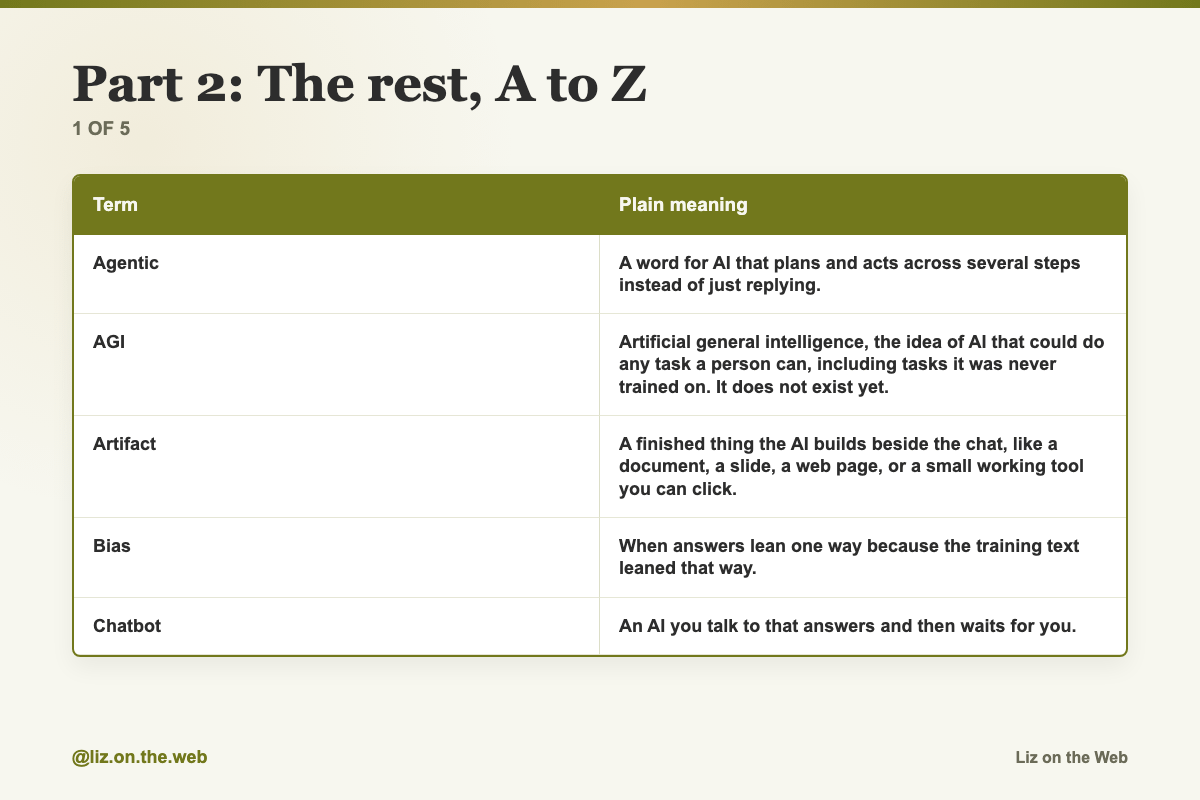
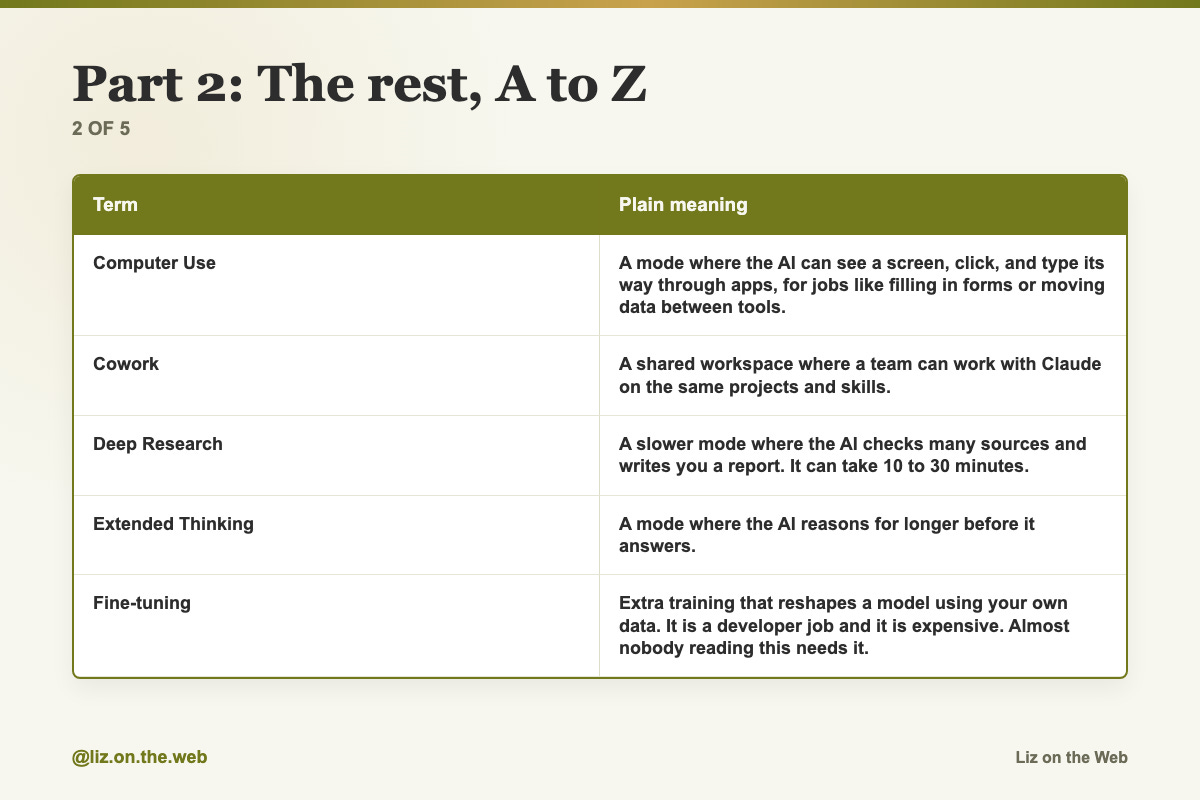
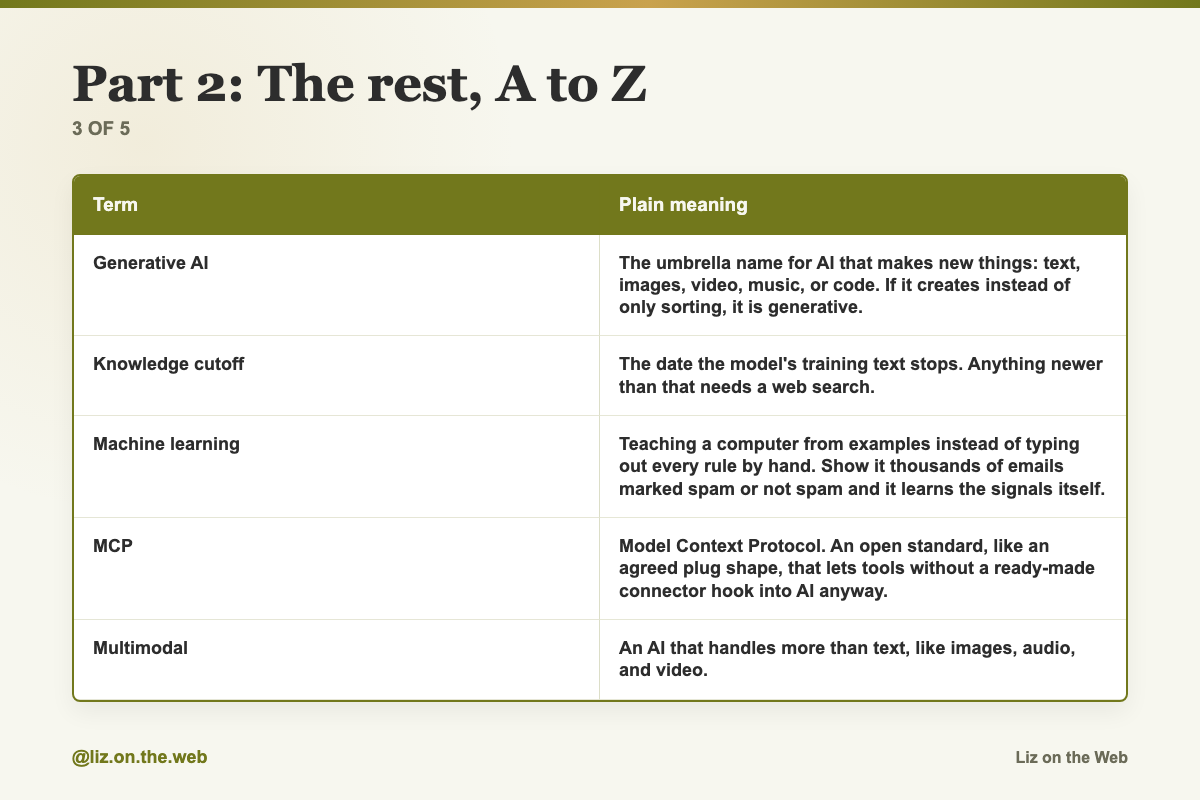
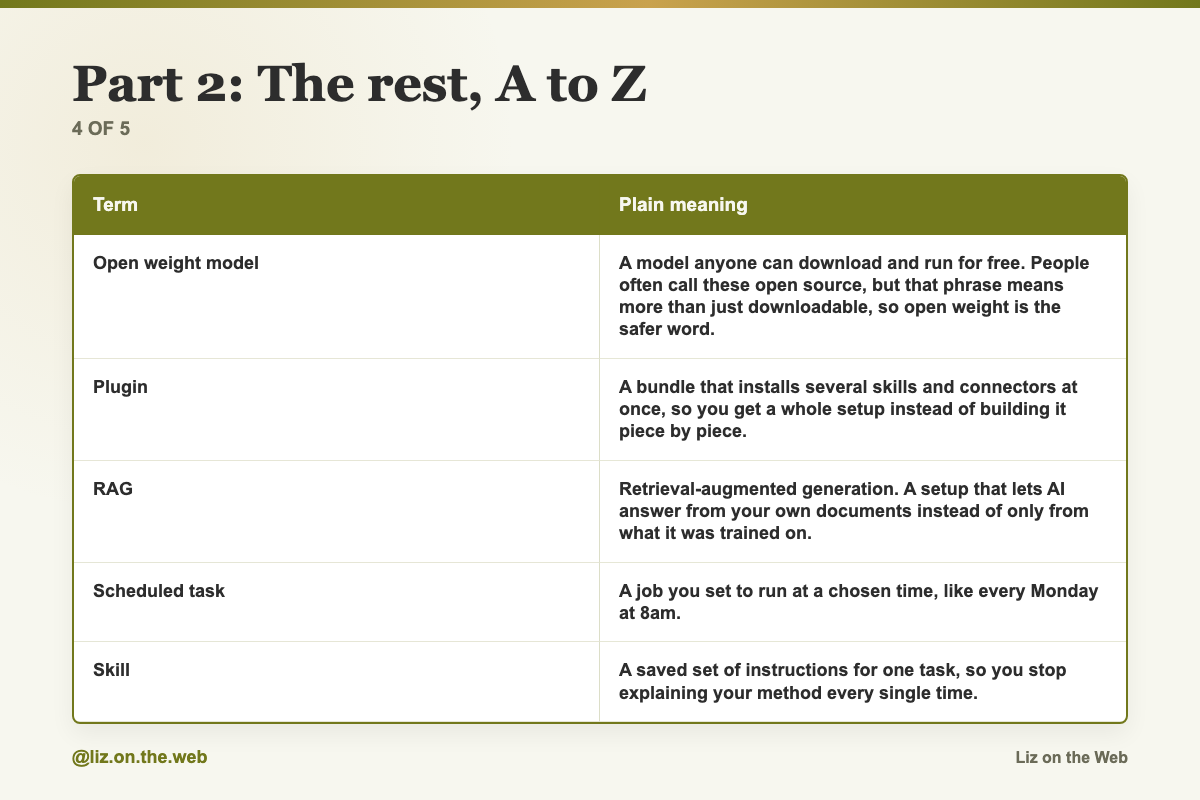
Term / Plain meaning
Agentic: A word for AI that plans and acts across several steps instead of just replying.
AGI: Artificial general intelligence, the idea of AI that could do any task a person can, including tasks it was never trained on. It does not exist yet.
Artifact: A finished thing the AI builds beside the chat, like a document, a slide, a web page, or a small working tool you can click.
Bias: When answers lean one way because the training text leaned that way.
Chatbot: An AI you talk to that answers and then waits for you.
Computer Use: A mode where the AI can see a screen, click, and type its way through apps, for jobs like filling in forms or moving data between tools.
Cowork: A shared workspace where a team can work with Claude on the same projects and skills.
Deep Research: A slower mode where the AI checks many sources and writes you a report. It can take 10 to 30 minutes.
Extended Thinking: A mode where the AI reasons for longer before it answers.
Fine-tuning: Extra training that reshapes a model using your own data. It is a developer job and it is expensive. Almost nobody reading this needs it.
Generative AI: The umbrella name for AI that makes new things: text, images, video, music, or code. If it creates instead of only sorting, it is generative.
Knowledge cutoff: The date the model's training text stops. Anything newer than that needs a web search.
Machine learning: Teaching a computer from examples instead of typing out every rule by hand. Show it thousands of emails marked spam or not spam and it learns the signals itself.
MCP: Model Context Protocol. An open standard, like an agreed plug shape, that lets tools without a ready-made connector hook into AI anyway.
Multimodal: An AI that handles more than text, like images, audio, and video.
Open weight model: A model anyone can download and run for free. People often call these open source, but that phrase means more than just downloadable, so open weight is the safer word.
Plugin: A bundle that installs several skills and connectors at once, so you get a whole setup instead of building it piece by piece.
RAG: Retrieval-augmented generation. A setup that lets AI answer from your own documents instead of only from what it was trained on.
Scheduled task: A job you set to run at a chosen time, like every Monday at 8am.
Skill: A saved set of instructions for one task, so you stop explaining your method every single time.
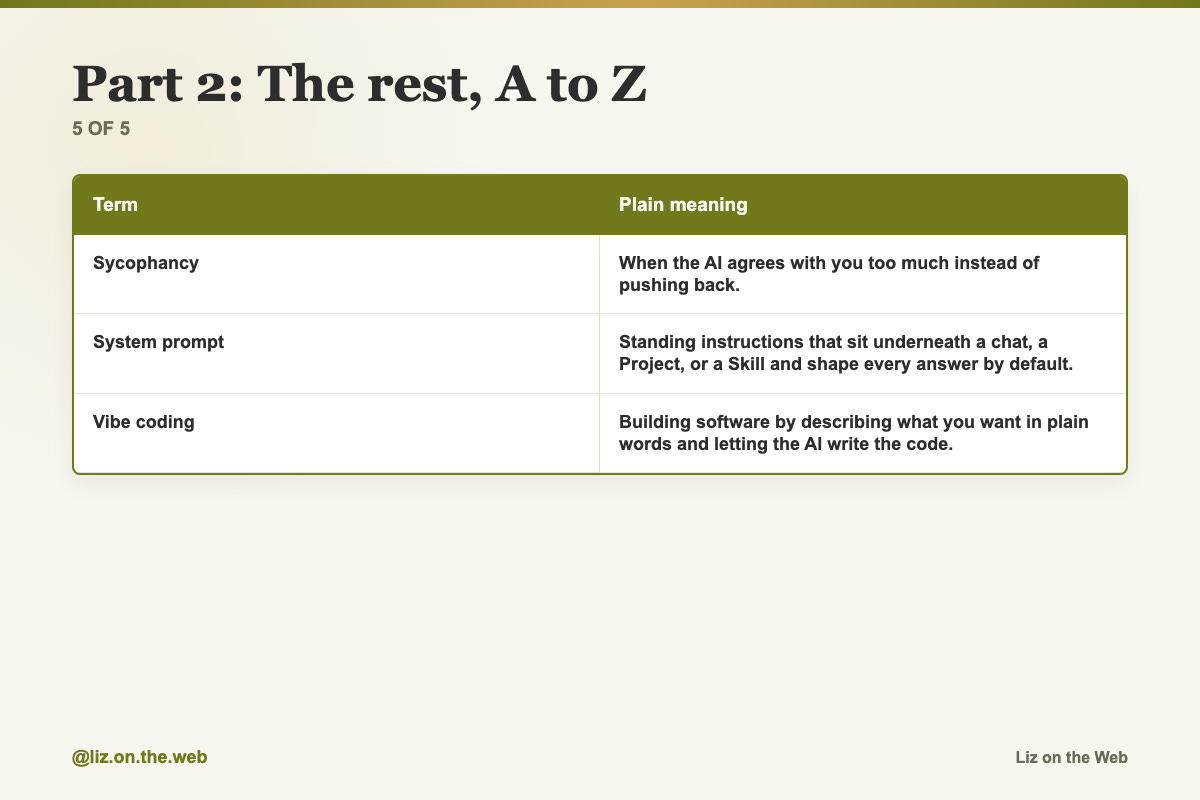
Sycophancy: When the AI agrees with you too much instead of pushing back.
System prompt: Standing instructions that sit underneath a chat, a Project, or a Skill and shape every answer by default.
Vibe coding: Building software by describing what you want in plain words and letting the AI write the code.
Part 3: The two mix-ups that trip almost everyone
Connector versus MCP. These get used as if they mean the same thing. They do not. A connector is a finished, one-click integration the AI company built for a popular app. MCP is the open standard that other tools use to plug in when no ready-made connector exists. As a user they feel similar. Under the surface they are different, and you will meet MCP again.
Skill versus plugin versus Project. A connector is the cable. A skill is the manual. A plugin is the package that holds several cables and manuals together. A Project is the workspace where you keep the job.
Part 4: The token math, and what to do when sources disagree
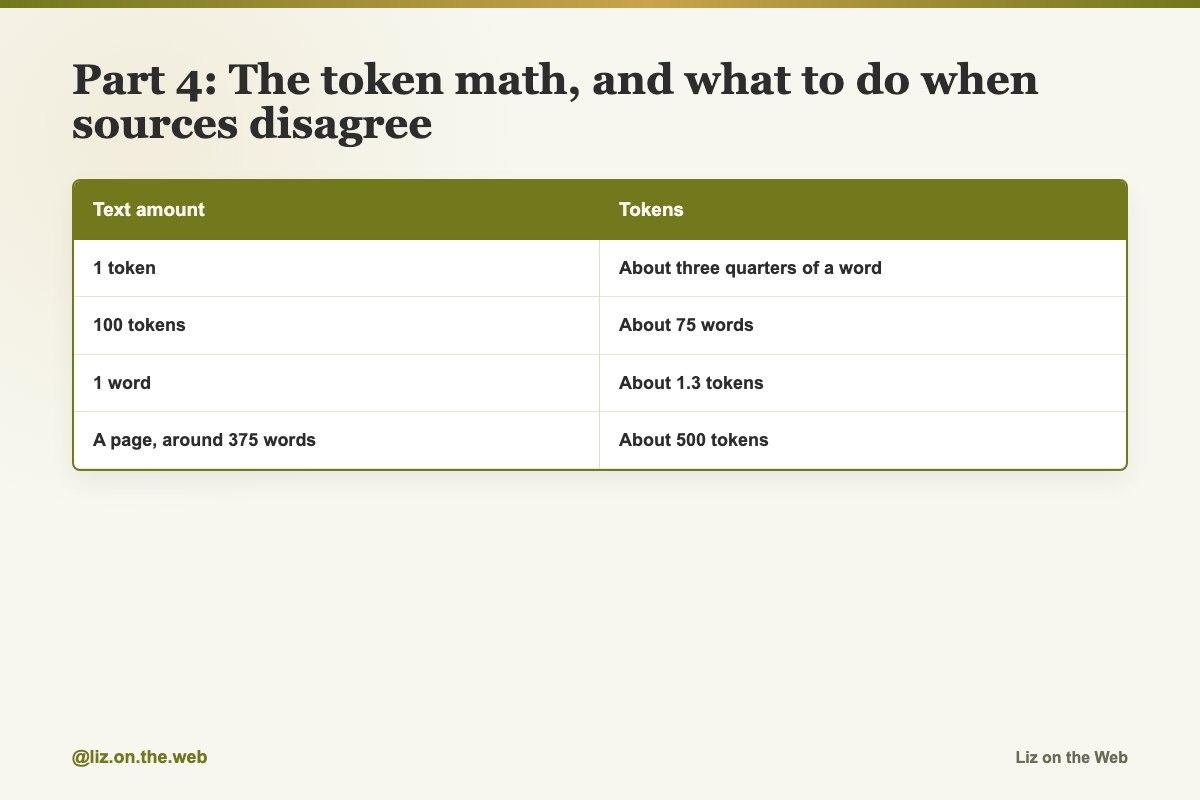
Tokens matter because limits and prices are counted in tokens, not words.
Text amount / Tokens
1 token: About three quarters of a word
100 tokens: About 75 words
1 word: About 1.3 tokens
A page, around 375 words: About 500 tokens
Sources disagree here. Some say a token is about half a word. Some say it is about one word. Some say it is about three quarters.
The rule for picking: use three quarters of a word. It is the version that matches the math table above, and it lines up with the common estimate that a 5,000 word document is around 6,500 tokens. Exact counts vary by model, so treat every token number as a rough guide, never a promise.
Context windows are big now. The newest top models can hold roughly a million tokens at once, which is about 750,000 words. That number moves with the model and sometimes with your plan, so check what your own tool says instead of trusting a number from an article.
Part 5: When a word is not on this list
Do not guess and do not scroll past. Paste it into the AI and ask.
Copy and paste
The term explainer
Use this any time a new AI word shows up and you do not want to fake it.
Explain this AI term in plain English: [TERM]

Tell me three things:
1. What it means in one simple sentence.
2. When I would actually use it.
3. Whether a non-technical person needs to care about this, or can safely ignore it for now.
The prompt shape
Use this to turn a vague request into one that works. Fill in every bracket.
Write a [length, for example 3-sentence] [format, for example Instagram caption]
for [who it is for, for example a life coach]
targeting [the exact audience, for example burnt-out 9-to-5 workers],
[tone, for example casual],
end with [the ending you want, for example a question].
Vague versus specific
Keep this pair where you can see it. It is the fastest lesson in prompting.
VAGUE: Write something about marketing

SPECIFIC: Write a 3-sentence Instagram caption for a life coach targeting burnt-out 9-to-5 workers, casual tone, end with a question
Three one-line fixes for three quality problems
Add these lines when the AI makes things up, agrees too easily, or leans one way.
If you do not know something, say "I don't know" instead of guessing.Argue against me. Do not just support what I said.Give me the strongest case for the opposite view.Watch out
Nodding along instead of asking
You read past a word you do not know and the confusion compounds. Three paragraphs later nothing makes sense. Look it up, then keep moving. Ten seconds now saves the whole page.
Blaming the model for a vague prompt
"Write something about marketing" was never going to give you anything usable. Before you decide the AI is weak, check whether you named the length, the audience, the tone, and the format.
Trusting a confident answer
A made-up fact sounds exactly as sure as a correct one. That is what makes it risky. Check names, dates, prices, numbers, and anything legal or medical. Treat AI output as a first draft, never as the final authority.
Staying in one long chat forever
Once you fill the context window, the AI starts dropping the beginning of the conversation. If a long chat starts feeling forgetful, that is your sign. Start a fresh chat and paste in the few things it still needs.
Counting words when the bill counts tokens
Your word count and your token count are not the same number. Use 100 tokens for about 75 words, and about 500 tokens for a page.
Confusing today's chatbot with AGI
AGI is a debate about the future. It is not a description of the tool in front of you. Arguments about AI taking over are usually arguments about AGI.
Reaching for fine-tuning
Fine-tuning sounds like the serious option. It is technical, it costs money, and you almost certainly do not need it. A good Skill or Project gets you most of the same benefit.
Trying to learn every term at once
You do not need the whole list on day one. Learn the ten. Pick up the others as they come up in real work.
Check yourself
[ ] I can explain a prompt, a token, a context window, and a hallucination without looking.
[ ] I said three of the ten terms out loud in my own words.
[ ] I know a connector is a ready-made link and MCP is the open standard for everything else.
[ ] I know a skill is a saved method and a plugin is a bundle of them.
[ ] I can estimate that a page of text is roughly 500 tokens.
[ ] I know to start a fresh chat when a long one goes foggy.
[ ] I have the term explainer prompt saved somewhere I can find it.
[ ] I know AGI is not what I am using today.
Do this now
Pick the three terms on this page you could not have explained ten minutes ago. Say each one out loud, in your own words, without looking back at the definition.
Keep going
Next in AI for Entrepreneurs:
Part 2: What an .md file is, and why this course lives in them
Part 3: The five levels of AI use, and which one you are on
Part 4: Starting the right way, and the first week that works
Every part of this course sits in reading order in the free AI for Entrepreneurs course outline.
This part is free, start to finish. Subscribing keeps the rest of the course coming and opens the paid parts.
Tell me in the comments which AI word tripped you up first, and I will point you at the right next part.